1-Click Product Render Pro is a Blender add-on for setting up product-render studios around an existing model. The current Superhive listing calls the renamed product Ranova Product Studio 2.1 and says it was previously known as 1-Click Product Render Pro. The supplied catalog record lists version 1.2.0, so check the publisher listing for the current file and version before installing.
Build a studio around a product assembly
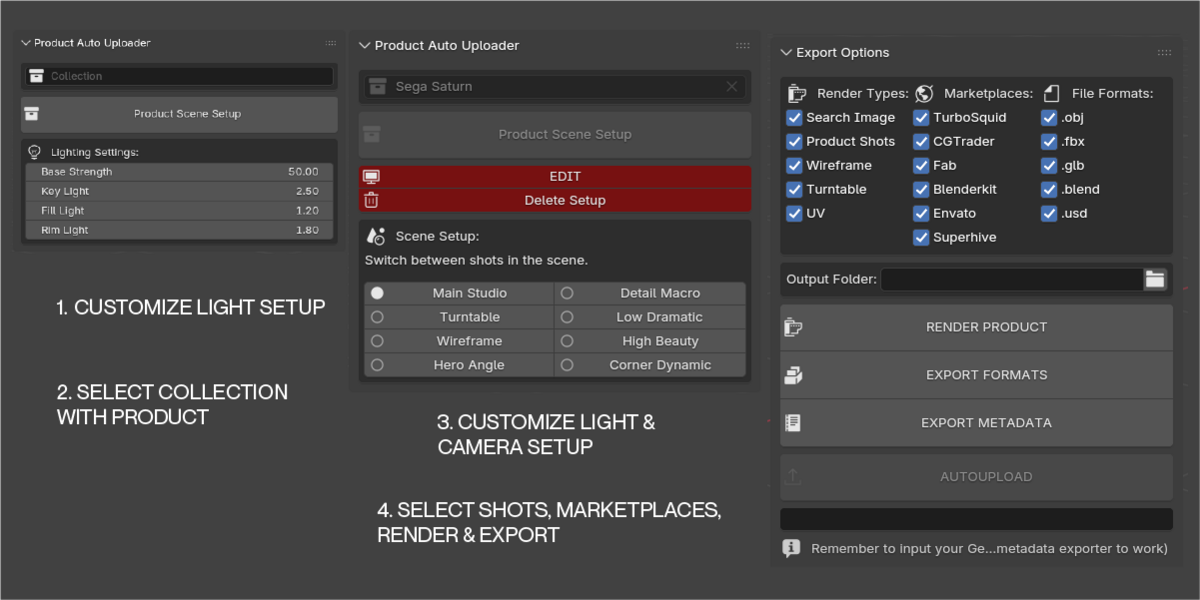
Choose a selected assembly, include its children if needed, and generate a studio. For a catalogue of products, the documented workflow can create separate studios for individual top-level assemblies. The studio uses evaluated copies of the product geometry, keeping the source scene separate. To change the source geometry or product selection, return to the source, make the edits, then generate or update the studios again.
The quick-start documentation recommends saving the Blender project, removing an older Product Render or Product Studio edition, and restarting Blender before installing the new ZIP from Preferences. After enabling the extension and restarting, open the 3D Viewport sidebar with N, choose Ranova Render and Start Here, then generate and open a studio.
Adjust lighting, backdrop and camera
Studio controls cover light power and colour, fill and rim lighting, softbox size, camera framing, perspective or orthographic projection, and depth of field. Choose a solid-colour or gradient environment, or use your own licensed HDRI. Backdrop options include a ground plane, a seamless cyclorama or no floor. Supported settings update the generated studio after a short pause.
Shot lists can include Hero, Front, Side and Top views, along with custom camera views. For several products, use a shared studio for a selected assembly or separate studios for catalogue assemblies. Colour variants work with supported copied materials; the documentation specifies a Principled BSDF Base Color that is not linked to a texture, so texture-driven materials need a different workflow.
Review render output and limits
The add-on can render PNG, JPEG and OpenEXR images, with optional Cycles compositing passes. Watermarks are applied during rendering, so they do not appear in material preview. Turntable, orbit and floating animations render as numbered image sequences. MP4 encoding is a separate step that requires a locally installed FFmpeg executable, and MP4 does not preserve transparency.
Studio geometry is a static evaluated snapshot of the source frame; source animation is not transferred. The animation tools can animate the generated copies or camera. Inspect reflections, glass, polished metal, labels, framing and image quality before delivery. The publisher lists the add-on code under GNU GPL version 3 or later and includes a LICENSE.txt file.
Blender compatibility
The current product details and quick-start documentation require Blender 5.2 or newer and report testing on Windows with Blender 5.2.2 LTS. The marketplace details panel also displays Blender 3.0–5.2, which conflicts with those current requirements. Check the publisher listing before installing, especially if you use an earlier Blender release.