Product Autouploader is a Blender add-on for setting up studio scenes, rendering product views, and preparing 3D files for marketplace listings. Its Superhive listing describes a workflow built around a selected model collection, preset cameras, adjustable lights, and export options.
Set up a studio scene
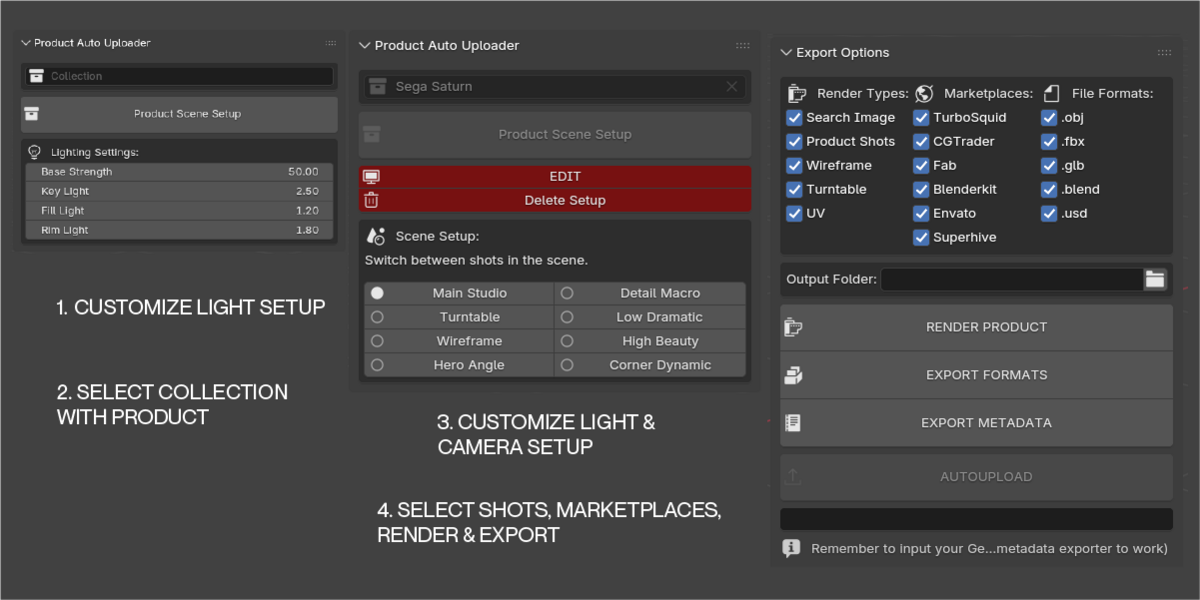
Organize the parts of a model in a Blender collection, open the Product Auto Uploader panel in the 3D Viewport sidebar with the N key, and choose the collection. Product Scene Setup creates eight camera angles, a Key, Fill, and Rim lighting setup, a shadow-catching ground plane, and scene organization. You can adjust Base Strength and the individual light settings, then use Edit to modify the setup or Delete Setup to remove it. The product documentation recommends placing the model at the world origin and facing it toward +Y for setup.
Preview views and render types
The preset cameras cover different listing needs: Main Studio for a primary image, Turntable for a rotating view, Wireframe for mesh detail, Hero Angle for a dynamic perspective, and Detail Macro for close-ups. Low Dramatic, High Beauty, and Corner Dynamic provide other angles. Export options include search images, product shots, wireframe renders, 36-frame turntables, and UV layouts.
Prepare marketplace exports
The listing names preconfigured export settings for Superhive, BlenderKit, TurboSquid, CGTrader, Fab (Sketchfab), and Envato Elements. Supported 3D file formats are .blend, .obj, .fbx, .glb, and .usd. Choose target marketplaces and render types, set an output folder, then run the render, format export, or metadata export. Check the destination marketplace's current submission requirements before publishing the resulting files.
What the uploader does today
Direct uploading to marketplaces is listed as coming soon. The current workflow prepares scenes and exports files for you to upload separately. AI metadata generation for descriptions and tags requires a Gemini API key. The Superhive listing reports Blender 4.2 to 5.0 compatibility and an MIT license; AnyPlugins lists the add-on as free. Check the Superhive product page for current availability and terms.