3D Maker is a Blender add-on from El Jugenio 3D for designing and preparing models, previewing print layers, and handing files to a slicer. Its product listing specifies Blender 5.0 through 5.2, Windows, macOS and Linux, with an English or Spanish interface. Check the listing for current compatibility before installing.
Design and edit models in Blender
Easy Sketch turns freehand, polyline, Bézier, rectangle and oval drawings into geometry. Mesh Cutter offers Lasso 3D, freehand, polyline and Bézier cuts, plus Knife Cut with an on-screen HUD. Boolean tools handle editable cuts and unions, while Bend and Taper deform a model with on-screen handles. Calibre measures edges, faces and gaps; a box-size overlay shows dimensions as you transform an object. Normals Manager helps inspect and fix normals during print preparation.
Prepare parts for assembly and printing
The Pin & Joint System creates parametric pins and sockets for multi-part models, and Auto-Pin can add pins along a cut seam. Support Generator adds manual supports. You can split meshes by facesets, scale an object to exact real-world dimensions, align components, or make an exploded view that snaps back together. Printer Volume Manager provides a live fit check against a printer volume.
Paint and preview the print
Vertex Color Paint includes gesture painting, a palette manager, a magic wand and facesets. The Print Simulator previews printing layer by layer in the viewport; a materials helper organizes material assignment.
Export or send a model to a slicer
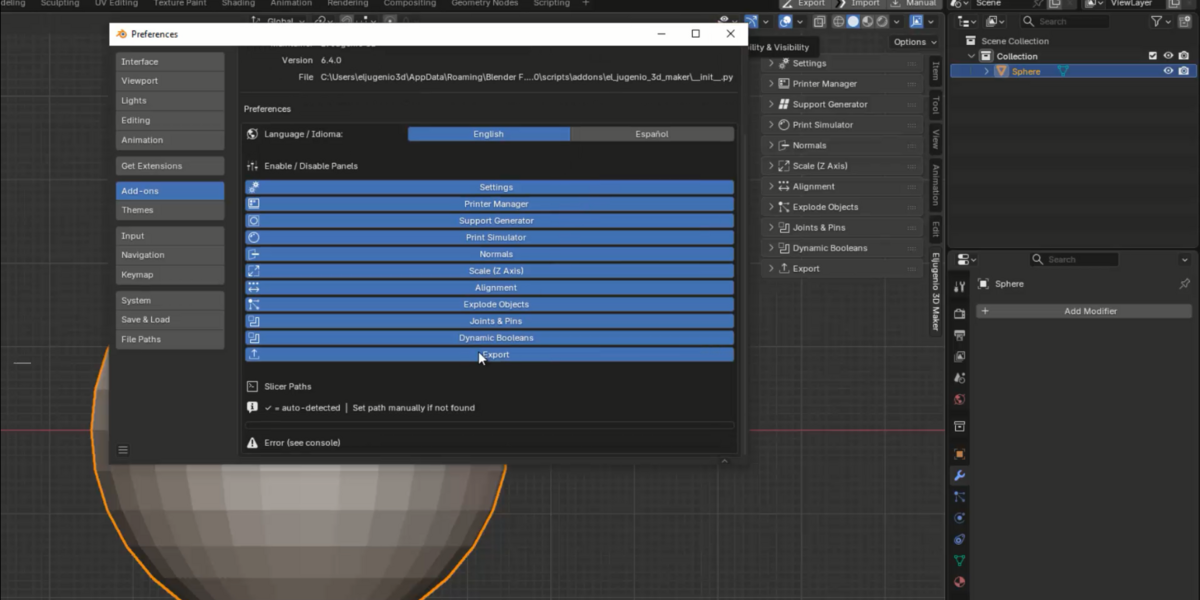
Send to Slicer lists Bambu Studio, OrcaSlicer, PrusaSlicer, Cura, ChiTuBox, Creality Print and Lychee. It can detect installed slicers or use a path you set manually. You can also export STL or OBJ files. The listing says these exports include vertex colors, and its FAQ specifically confirms that OBJ export preserves them.
The product is aimed at people who already model in Blender, including 3D printing hobbyists, prop makers, miniature designers, and product or prototype designers.
Installation
The quick-start instructions say to install the add-on from its ZIP through Edit > Preferences > Add-ons > Install, then enable it. Open the 3D Maker tab in the 3D Viewport sidebar with the N key. The listing says the tools are included in one add-on, so no other add-ons are required.