3DBrowser Pro R17 from Mootools is a desktop tool for browsing, previewing, organizing, and optimizing 3D assets. It combines a 3D file explorer, scene viewer, and image viewer, with Polygon Cruncher mesh optimization and texture atlas tools in the Pro edition.
Browse and preview 3D libraries
The file explorer helps you filter, sort, search, annotate, and categorize 3D files and images. Multiple tabs and a split view let you work between folders, while customizable thumbnails show a chosen viewpoint and display mode. 3DBrowser can also share previews with Windows File Explorer. See the Mootools feature overview for the full list of browser and organization tools.
Inspect scenes from different angles
The scene viewer handles textures, vertex colors, and user normals. It includes targeted zoom, orbit rotation, airplane navigation, and fast recentering, with saved viewpoints for later review. E57 support lets you open and explore point clouds from laser scans or 3D captures. The software recognizes many 3D formats, including 3ds Max and Maya through provided plugins, FBX, GLTF, USD variants, Blender, SketchUp, Cinema 4D, Collada, and STL.
Reduce polygon counts and prepare textures
Polygon Cruncher reduces mesh face counts while retaining detail and, when selected, textures, vertex colors, and normals. Its MagicCruncher option chooses an optimization level for each object. After simplifying a model, you can create normal or ambient occlusion maps by transferring detail from the higher-resolution version.
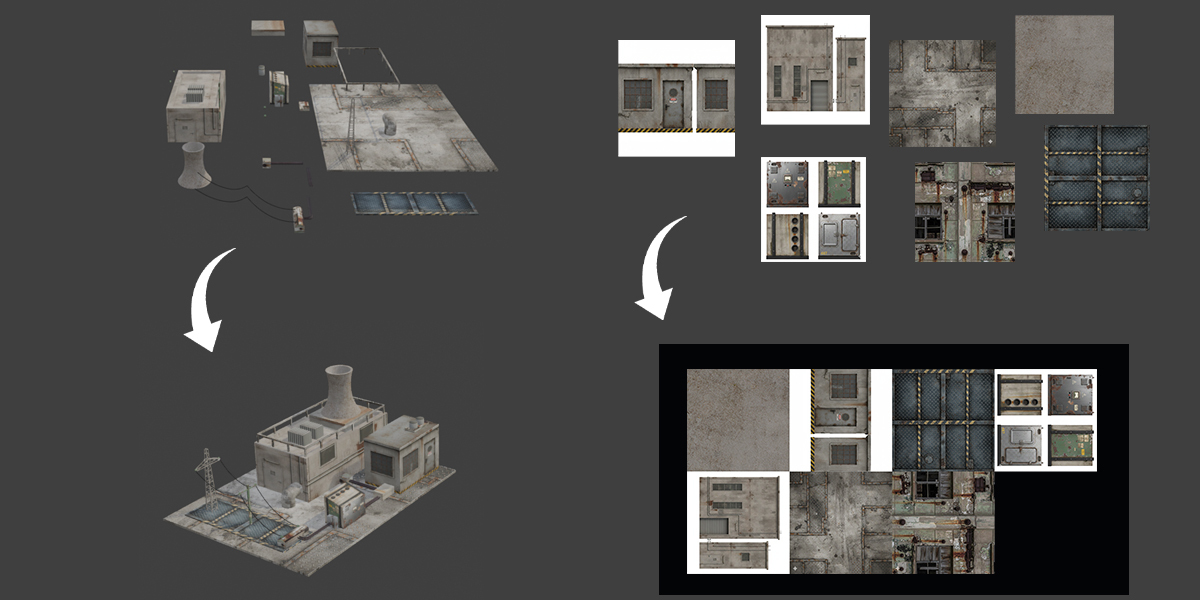
The atlas tool groups textures by PBR type and can detect duplicates. You choose atlas dimensions and can process an object or a scene. These functions suit asset preparation where lower polygon counts, consolidated textures, or fewer draw calls are useful.
R17 release and 3ds Max support
Mootools' release history lists R17.20 from June 2025 with improved USD and USDZ handling, scene merging, a 3ds Max 2026 plugin, and better 4K support. The history later lists R17.90 from May 2026, including a 3ds Max 2027 exchange plugin. Check the Mootools release notes for the host version supported by the build you plan to install.
Trial, price, and installation
Mootools offers a 30-day full trial of 3DBrowser Pro. Autodesk's marketplace listing says the app uses a custom installer. The marketplace and Mootools' price page show different prices, so confirm the license and final amount before checkout. The Autodesk listing provides the product overview and purchase route.
3DBrowser Pro R17 may fit artists and teams that manage mixed-format libraries, inspect scenes outside their main 3D package, or prepare meshes and textures for export. Its standalone browser and provided host plugins support different parts of that workflow.