Addon Manager Pro by ZibadMend is a Blender add-on for managing installed add-ons and extensions from one panel. It includes controls for finding, enabling, disabling, installing, backing up, restoring and uninstalling items. The product listing also describes a separate JSON profile export for saving an active add-on configuration.
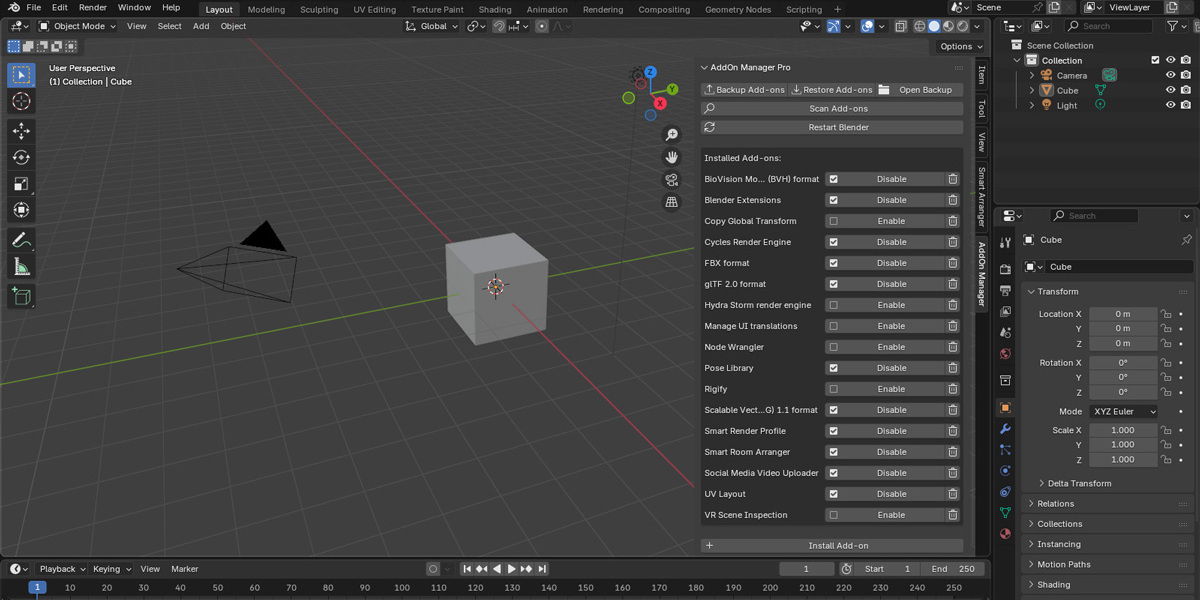
Manage installed add-ons and extensions
The panel presents installed items in a scrollable list. You can uninstall add-ons you no longer use.
- Search and filter the installed list to find an item.
- Enable or disable add-ons and extensions from the panel.
- Install add-ons from a file and have them enabled automatically.
- Built-in Blender add-ons are locked and protected from accidental deletion.
Back up add-ons and export a profile
Addon Manager Pro provides two backup-related options. Timestamped ZIP files back up user add-ons for later restoration. A lightweight JSON file saves the active add-on configuration and can be imported on another computer or a fresh Blender installation.
Troubleshoot and restart Blender
For troubleshooting, one click disables all user-installed add-ons. A dedicated button restarts Blender to apply major changes. You can fully uninstall add-ons you no longer use.
Open the AddOn Manager panel
In the 3D Viewport, press N to open the sidebar, then select the AddOn Manager tab. The product listing also says the management panel is accessible under Edit > Preferences > Add-ons.
Compatibility and license
The Superhive product page's feature copy says Blender 4.1 and newer, while its details list Blender 3.6–4.5. AnyPlugins describes support as Blender 3.6 and newer, but the listings do not confirm support for a specific Blender build. Ask the developer to confirm support for your Blender build before installing. Review version details on the current product listing before installing. The product page lists Windows, Linux and macOS, and identifies the license as GNU GPL v3.0.