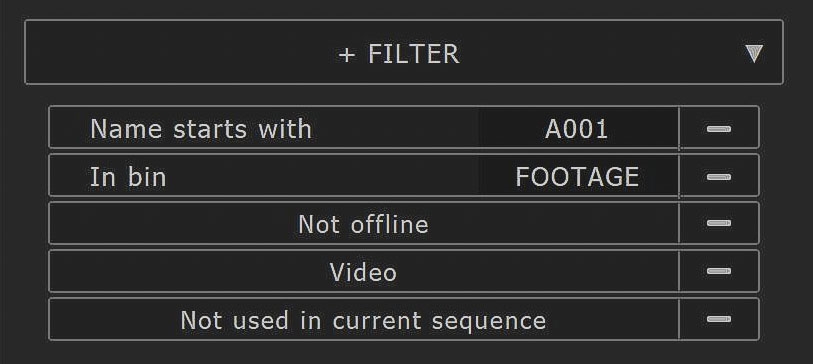
Selector for Premiere Pro is a tool by The Machine Must Work for selecting project items or timeline clips with filters. Filter project items or timeline clips by criteria such as name or sequence use, or load a saved selection preset in one click. The product listing also shows controls for navigating selected clips.
Filter project items and clips
Selector filters both item properties and clip context. Examples include:
- Name and location: match names that start with, end with, contain, or equal a value; include or exclude bins and folders; and match folder paths.
- Media properties: filter by duration, file extension, audio or video type, offline status, adjustment layer status, or proxy availability.
- Sequence context: find clips used in the current sequence, on a track, at or around the current time indicator, or within sequence in and out points. Other criteria include selected state, nested sequences, merged clips, and multicam sources.
- Clip relationships and effects: check whether audio or video is linked, whether speed is changed or reversed, whether an effect has a particular name, or whether a clip is a Mogrt.
These options let editors narrow a selection by project organization, media details, or timeline state, depending on what the task calls for.
Reuse selection presets
Selector lets you save presets for later. That is useful when the same selection criteria recur, such as finding offline media, locating clips used in a sequence, or isolating items by name or folder. The listing also shows Quick Presets and a quick access bar, so saved selections can be reached from the tool's interface.
For reviewing a group of selected clips, the product includes navigation through the selection. Its version history says navigation controls can be switched on or off in preferences.
Compatibility
The product page lists Premiere Pro 2020 through 2027 as compatible and shows version 1.7.0 dated November 23, 2025 in its version history. Check the linked listing for current product details.