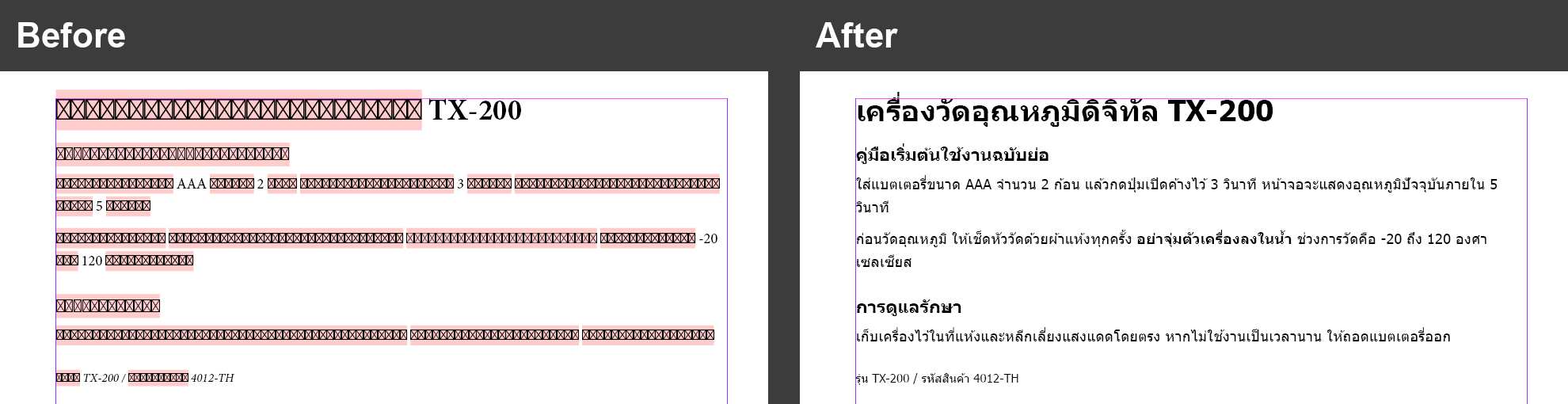
Language Font Mapper applies a font map to a translated Adobe InDesign document in one run. Choose a target font family for each source font, then apply the map to paragraph styles, character styles, existing composite font entries and local formatting that still uses a mapped font after the styles change. Local formatting under nested, GREP, line or drop-cap styles is counted in the report but not rewritten.
Map fonts and language settings together
Run the script from InDesign’s Scripts panel after saving the active document. Its font list shows where each font is used. Choose a target family for each source font; the map can also set the language and paragraph composer on paragraph styles. If a target font is also mapped as a source in another row, Apply stops and changes nothing. You can leave the style choice at “(same style, or nearest)” to retain styles such as Regular, Bold and Italic where the target family supports them.
The script can also preserve 0–9 digits for Thai, Arabic and similar languages. This option is on by default and sets the digit preference on paragraph styles and on character styles that already specify digits.
Review changes and missing glyphs
After Apply, the result dialog lists changed definitions, nearest-style fallbacks and the missing-glyph count before and after the run. Language Font Mapper also writes a TXT report and a CSV of changes beside the saved document. The full Apply operation is one undo step.
Composite-font changes may not appear in the document’s text until you save, close and reopen the file. Check the displayed text and glyph count after reopening. The script reports a missing target font or an unavailable matching style; if no target style matches, it keeps the original font.
Profiles for recurring language work
Save a map as a JSON profile with its font mappings, language and composer settings. Load that profile for another document in the same language. If a target font in the profile is not installed, that mapping is listed and skipped.
Requirements and limits
Language Font Mapper is a compiled ExtendScript file (.jsxbin) for Adobe InDesign 2026 or later on Windows. The document must be saved before running it, and target fonts must already be installed. macOS has not been tested; the product page recommends trying the free trial on a Mac before buying.
The script works on the active document, not a book or folder. It does not install fonts, translate text, create composite fonts, apply composite fonts to styles that do not use them, or change text direction. Local formatting under nested, GREP, line or drop-cap styles that set a font is counted in the report but not rewritten.
The separate trial allows unlimited scanning, missing-glyph counts and reports, while Apply is limited to five definitions per document. See the Language Font Mapper product page for the trial and current product details.