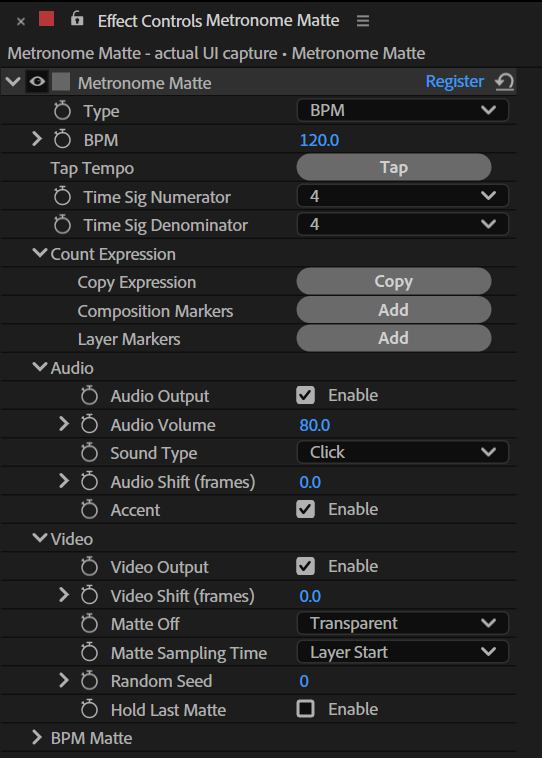
Metronome Matte switches footage or image layers in an After Effects composition on a musical tempo or a repeating schedule. It suits edits where layer changes need to follow a beat, a fixed duration, or an uneven pattern. Place your source layers in the composition, apply the effect to a solid, assign a layer to each beat or interval, then preview the sequence.
Choose how switches are timed
- BPM: Enter a tempo or use Tap Tempo, select a time signature, and use Video Shift to align the first beat. A bar can contain up to 16 beats, and video can divide each beat into four intervals.
- Time: Set a fixed interval in frames or seconds and assign layers to as many as 100 slots. Accent Interval sets how many intervals run before the cycle repeats.
- Keyframe Loop: Add at least two Timing Keys to set switch times. The pattern between the first and last keyframes repeats, allowing uneven intervals.
Set how each source plays
Metronome Matte includes six sampling modes, such as Layer Start, Comp Time, and Layer End. You can choose a different mode for each beat or interval. Stretch to Beat fits the source section between its in and out points into one interval. Random Still selects a frame for each active interval, while Random Layer From Comp selects among layers in a precomposition; changing Random Seed changes the selection sequence. Hold continues the previous source and sampling mode through an interval. With Random Still, it keeps the selected frame on screen.
For timing reference, choose Beep, Click, Tick, or Woodblock and set an accent. Audio and video offsets can be adjusted separately in frames.
Markers, expressions, and activation
The effect can place composition or layer markers at switch times and copy an expression that returns the current beat or interval number. Marker creation and copying the expression require license activation. Before activation, the video has a magenta crosshatch and audio plays only during the first three seconds of the layer.
Compatibility and license limits
The listing identifies support for After Effects 2025, 2026, and 2027. On Windows it supports x64 After Effects, not Windows ARM64. On macOS it is a universal binary for Intel and Apple Silicon. The published EULA permits one copy on one computer at a time; multiple users or computers require an appropriate license for each user and each copy.