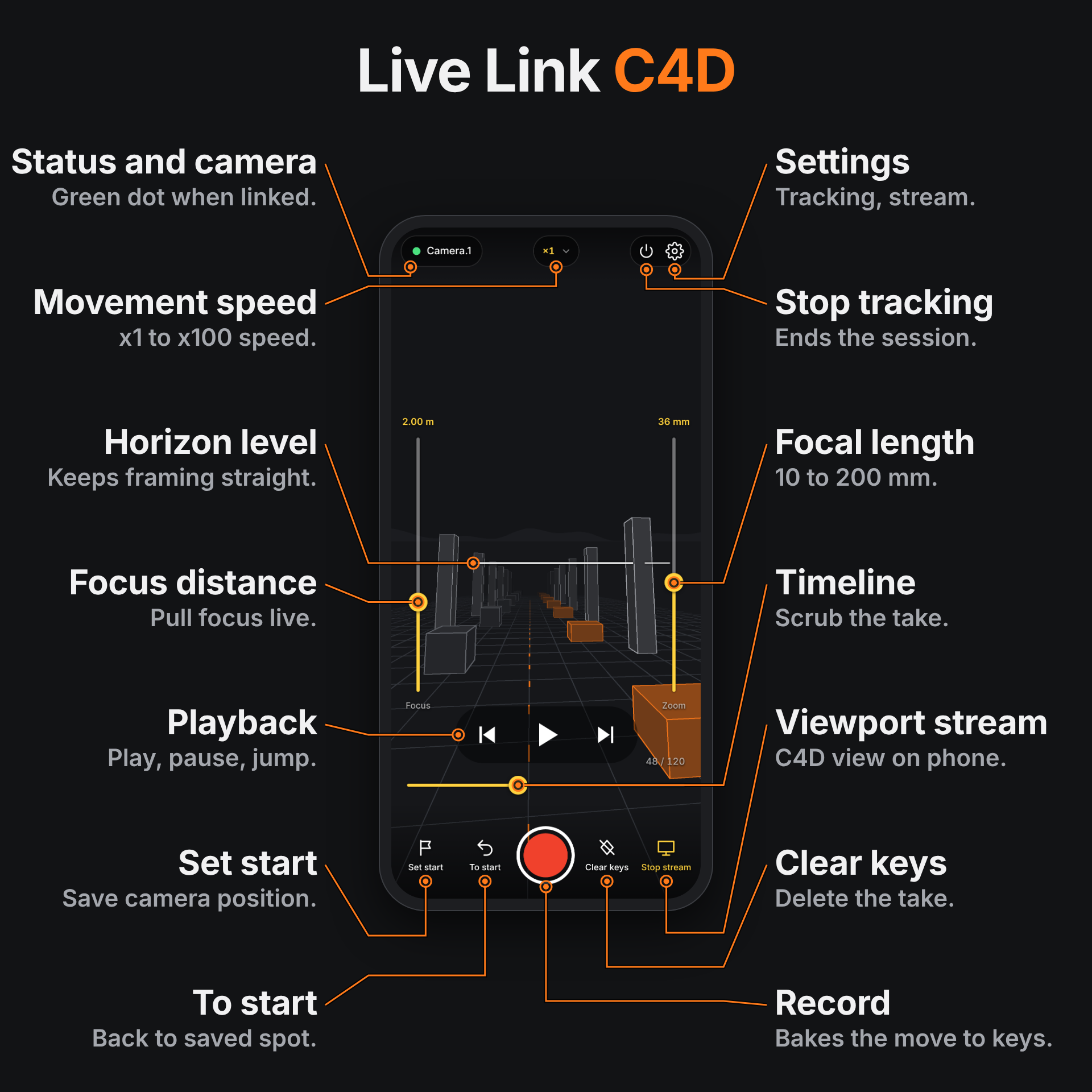
Live Link C4D turns an ARCore-compatible Android phone into a handheld virtual camera for Cinema 4D. The Android setup requires Chrome and Google Play Services for AR, with the phone and computer on the same Wi-Fi network and VPN off. Tap Record to start the Cinema 4D timeline; moving the phone then drives a scene camera and records the move as keyframes in sync with the scene animation. This suits artists who want to block a shot by walking through it. iPhone and other browsers support rotation tracking only.
Connect an Android phone to Cinema 4D
Open the plugin to display its QR code, scan it with an Android phone, and open the link in a browser. Keep the phone and computer on the same local Wi-Fi network, with VPN off. No phone app installation is required. The Android setup requires an ARCore-compatible phone, Google Chrome, and Google Play Services for AR.
Record an Android camera move with the scene
On the listed Android setup, tap Record on the phone to start the Cinema 4D timeline, then move through the shot. When you stop, the camera movement is baked to keys frame by frame, in sync with the scene animation. You can review the take on the phone by playing, pausing, scrubbing, or jumping to either end. Clear the camera keys to record another take.
Adjust framing and motion
On the listed Android setup, the phone interface includes focus distance and focal length controls. Focus distance can be adjusted during a take, and focal length ranges from 10 mm to 200 mm. The plugin also offers live stabilization, with settings from raw handheld motion to smoother movement. Movement scales of 1x, 25x, 50x, 75x, and 100x suit different scene sizes. You can select a camera, set a start position, or parent the camera to an object so its movement stays relative to that parent.
See the viewport while you move
On the listed Android setup, Live Link C4D can stream the Cinema 4D viewport to the phone at up to 60 frames per second over local Wi-Fi. Choose a stream quality in the settings and turn the stream off when you only need tracking to save phone battery and keep it cool.
Check platform details before installing
The compatibility panel lists Cinema 4D 2024 through 2027. The requirements section specifies Windows and Android setup, while the version 1.1.0 history, dated November 8, 2026, adds Mac and iPhone/iPad compatibility. Those requirements limit iPhone and other browsers to rotation tracking only. Check the current install notes for the exact features available on your device.