Arbitrary Align is a Blender add-on from Ikari Ltd for moving, rotating, scaling and projecting geometry with snap points and custom reference planes. Its Snap Point system uses vertices, edge midpoints, face centers, face surfaces and grid points as anchors. The official listing identifies it as a GPL add-on compatible with Blender 3.0 to 5.2 and marked Blender Extension compatible.
Snap transforms to model geometry
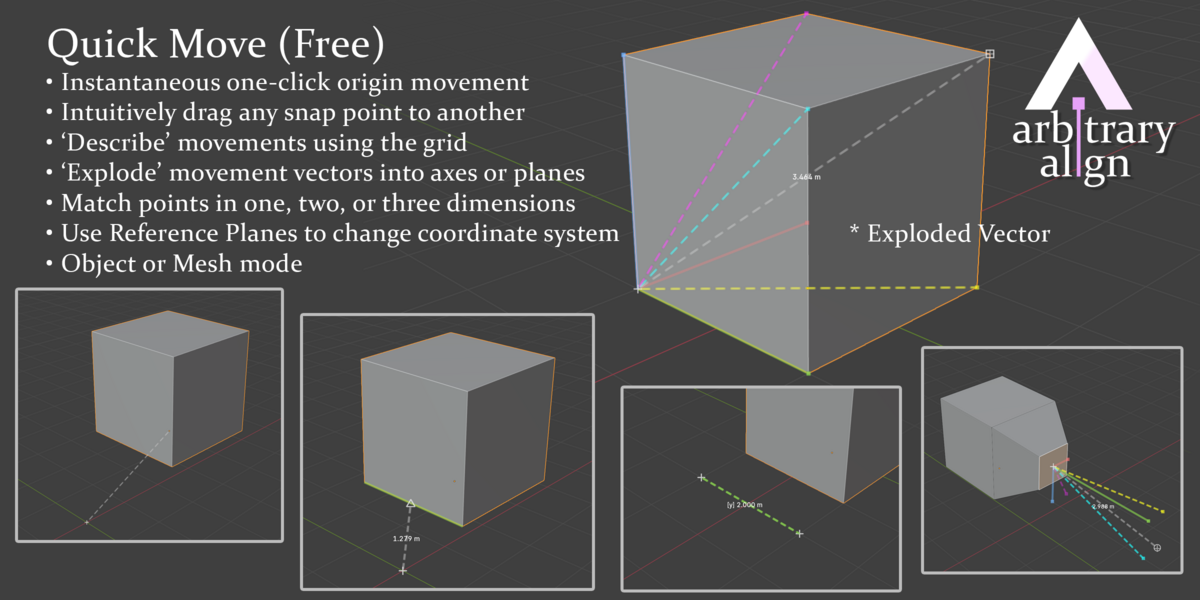
Quick Match adds snap-based actions to Blender's G, R and S transforms when enabled in the Arbitrary Align panel. Hold G to translate: click a snap point to move the selection there, or drag between two points to define the movement. R can rotate toward a snap point's normal or between two points. With S, drag between two edge-based snap points to scale the selection until its A-to-B length matches the dragged distance. The product documentation describes these controls in detail.
Set a working plane
A reference plane is a temporary coordinate system that you can orient from a snap point. Its grid spacing and subdivisions are adjustable, and it integrates with Blender's orientations and constraints. This gives you a defined surface for work that follows an angled face or another direction outside the usual global axes.
Project geometry with a chosen vector
Projection tools place selected mesh geometry or whole objects onto the active reference plane along a chosen vector. The vector can come from an edge, a normal or a line you draw; Quick Projection uses the plane's normal. The product description says vertices on non-coplanar faces can be projected onto a shared plane without distortion using custom vectors. A Proxy Point can provide an origin for projection operations. Reference planes can also mirror or bisect geometry.
Where it fits
The toolset suits low-poly and hard-surface modeling, where placement and face alignment affect the final mesh. One documented example uses G to drag between two object centers, then Shift to show component vectors; choosing the XY vector aligns the objects vertically. You can also use the same movement operations on mesh points, snap an object origin, or move geometry to exact coordinates in reference, global or local space.
Compatibility and edition details
The listing reports Blender 3.0 to 5.2 compatibility, GPL licensing and Blender Extension compatibility. The documentation marks Quick Move, Define Origin and Measuring Tool as included in the free edition. Check the current listing for download and edition details.