Audio Importer by GhostVertex is a Blender add-on that bakes imported sound into 10 frequency ranges for node-based control. It creates nodes for those ranges and can add the audio to Blender’s Video Sequence Editor.
Bake audio for node use
In the Geometry Nodes editor, select an object and add a Geometry Nodes setup, then open Audio Importer from the N-menu. Enter the sound file path and choose Bake Audio. The add-on creates the frequency nodes and attaches an All_Frequency_VJ_Trip node to the cursor. If that node already exists in the tree, it stays where it is. You can also add frequency nodes from the Audio Importer panel or an editor’s Add menu.
Use the frequency outputs
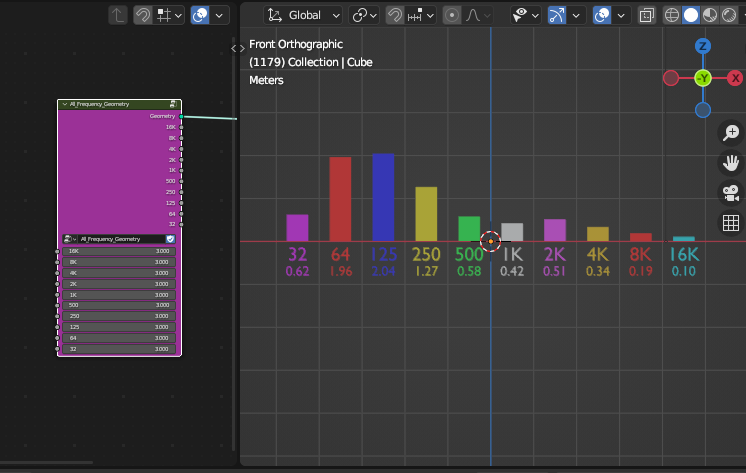
The All Frequency Node is available in Geometry Nodes. Individual frequency nodes are available in Geometry Nodes, Shading, World Shading and Compositing. They include minimum and maximum controls, so you can adjust a frequency range for a particular setup. Use a node’s sound or value output to drive a setting such as emission brightness.
The geometry output places frequency columns at world coordinates 0, 0, 0 to illustrate signal strength; use a node’s sound (value) output to influence settings.
Timeline and track behavior
The bake starts at the scene’s start frame and adjusts the timeline end to match the sound file’s length. Audio is added to the sequencer when that option is checked. Audio Importer can bake one track per Blender file. Baking again overwrites the existing baked tracks. To change the starting point, set a different scene start frame and bake again.
Installation and compatibility
The Audio Importer documentation says to download the ZIP for your Blender version, leave it compressed and drop it into an open Blender window to install it. If the exact version is unavailable, the documentation gives the example of using the next lower version. For an upgrade, uninstall the add-on, restart Blender and install the new version.
The Superhive listing marks Audio Importer as Blender Extension compatible, lists Blender 4.2 through 4.5 and notes that support will stop after Blender 5.0. Check the current download details for your Blender release. The listing identifies the license as GPL. Audio Importer is also part of GhostVertex’s Music Video Toolkit.