Auto Create Output + Render Folder is a Blender add-on for naming and organizing render files. It builds output paths from tokens such as {blendfile}, {scene}, {date}, {resolution}, and {version}. It can create subfolders and save still renders automatically. For animations, it uses Blender's internal animation render.
Choose filenames and folder layouts
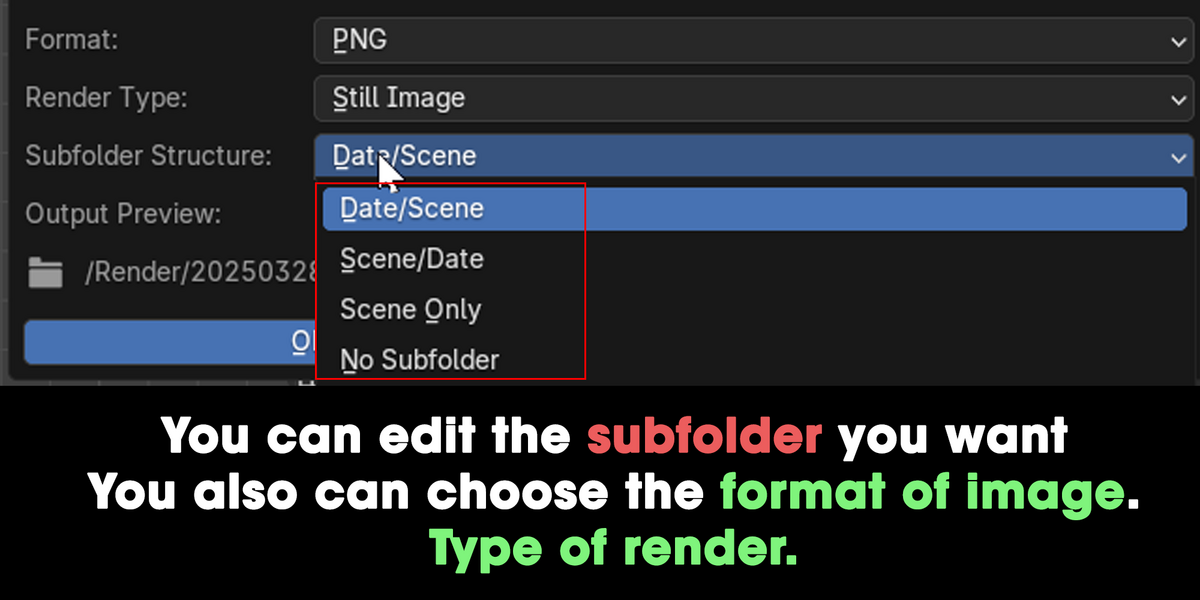
Select a folder arrangement such as Date/Scene, Scene/Date, Scene Only, no subfolder, or a custom structure. A live preview shows the full path before rendering. For example, a render might be saved as /Render/20250321/Forest/MyProject_Forest_20250321_1920x1080_v01_0001.png. If a file with that name already exists, the add-on increments the version number, such as v02 or v03.
Render stills or animations
A still render captures the current frame and saves the image to disk, so you do not need to save it manually from Blender's Render Result window. An animation render processes the full frame range. The popup offers PNG, JPEG, and EXR formats.
Install and use the add-on
- Download the add-on ZIP from the Superhive product listing.
- In Blender, open Edit, Preferences, then Add-ons. Choose Install, select the ZIP file, and enable the add-on.
- Save your
.blendfile. In the 3D Viewport, press N to open the sidebar, select Pipeline Tools, then click Auto Output + Render. - Choose a format, render type, and folder style. Check the path preview, then click OK to render.
Saving the project file first is required for the add-on to generate its output path. The product documentation includes a quick guide and an example output path.
Compatibility and license details
The product overview and documentation list Blender 3.0+ on Windows, macOS, and Linux. The marketplace details panel separately shows Blender 2.6x-5.0, so confirm support for your Blender version with the seller. The listing displays an MIT license, while its overview describes individual or studio commercial use and says redistribution outside your team is not allowed. Check the current license terms before redistributing or using the add-on in a team pipeline.