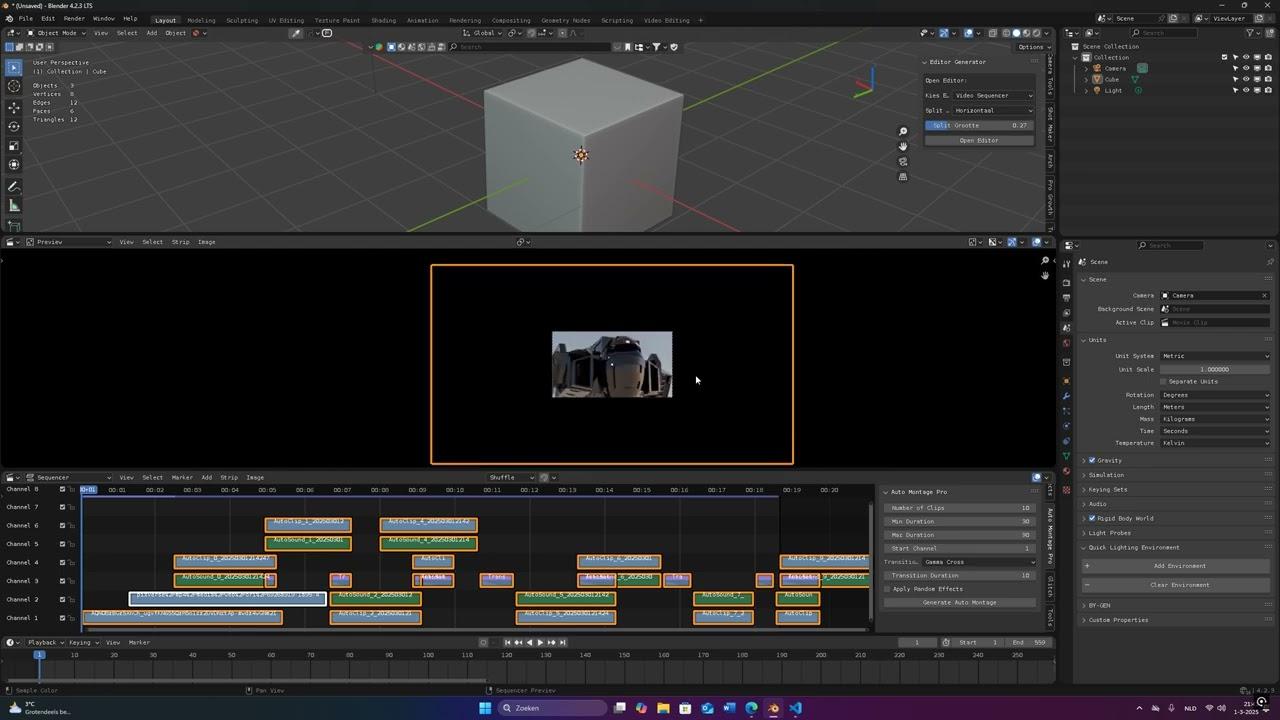
Auto Montage Generator Pro is a Blender add-on for assembling montages from selected video, image, and audio clips in the Video Sequence Editor (VSE). Choose the clips, set how many to use and how they should be arranged, then generate the montage on the timeline.
Set up a montage in the VSE
The controls are in a panel in the Video Sequence Editor sidebar. Set the number of clips, minimum and maximum clip duration in frames, starting channel, transition type, and transition duration. Select the clips you want to use and click Generate Auto Montage to place the result on the timeline.
The included documentation also describes a Clear Existing Strips option. When enabled, it removes all current strips before creating the montage, so check the timeline before turning it on. If generation reports that no clips are selected, select clips in the VSE first; the guide also recommends leaving enough timeline space for the clips and transitions.
Choose transitions and random effects
Transition options include crossfade, wipe, and gamma cross. You can set the transition duration in frames. When Apply Random Effects is enabled, the documentation says the add-on randomly applies one of four effects to each clip: blur, brightness and contrast, color balance, or speed changes.
These controls suit a quick first assembly from existing media. Review the generated sequence afterward to check its timing, transitions, and randomly applied effects.
Compatibility and package details
The product documentation describes Blender 2.93 or later as supported. The product listing names Blender 2.93, versions 3.0 through 3.6, and versions 4.0 through 4.2. If you use a newer release, confirm compatibility with the seller. The listing names Windows, macOS, and Linux, identifies the license as GPL, and says the package includes the add-on and a user guide.
See the Auto Montage Generator Pro documentation for installation instructions, setting details, and troubleshooting. Check the product listing for current product information.