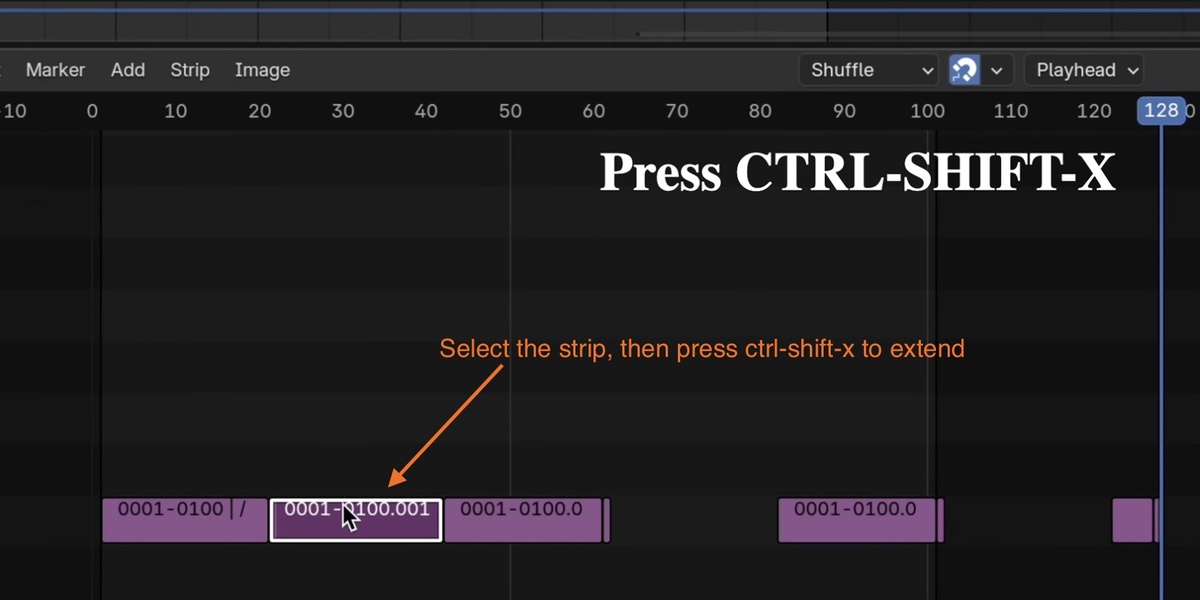
VSE Extend Strip to Next adds a command to Blender’s Video Sequence Editor (VSE). Select a strip and press Ctrl+Shift+X to extend it to the start of the next strip in the same channel. The product listing and its documentation describe support for video, audio, and effect strips.
How the extension chooses a strip
The command looks for a strip on the active strip’s channel that starts after the active strip ends. When several strips qualify, the command chooses the one closest in time. It extends the active strip’s duration to that start, which can fill a gap without manually adjusting its end frame.
If there is no suitable following strip, the add-on displays a warning in Blender’s status bar. If the active strip already reaches or overlaps the next one, the command makes no change. Check that the intended strip is selected and that its next target is on the same channel.
Using the VSE command
- Select the strip you want to extend in Blender’s Video Sequence Editor.
- Press Ctrl+Shift+X. The add-on extends the active strip to the start of the closest qualifying strip in that channel.
- Use Blender’s undo command if you want to reverse the edit.
The operator may also be available from a menu, and no additional dependencies are required.
Compatibility and license
The Superhive product details list Blender versions 2.83 to 5.1 and mark the add-on as Blender Extension compatible. The product description and documentation also say Blender 2.80 and later, including adaptation to API changes in Blender 5.0 and later. These version statements differ, so check the developer’s current listing for the release you use. The product details identify Blender.Fun as the developer and list the license as GPL.