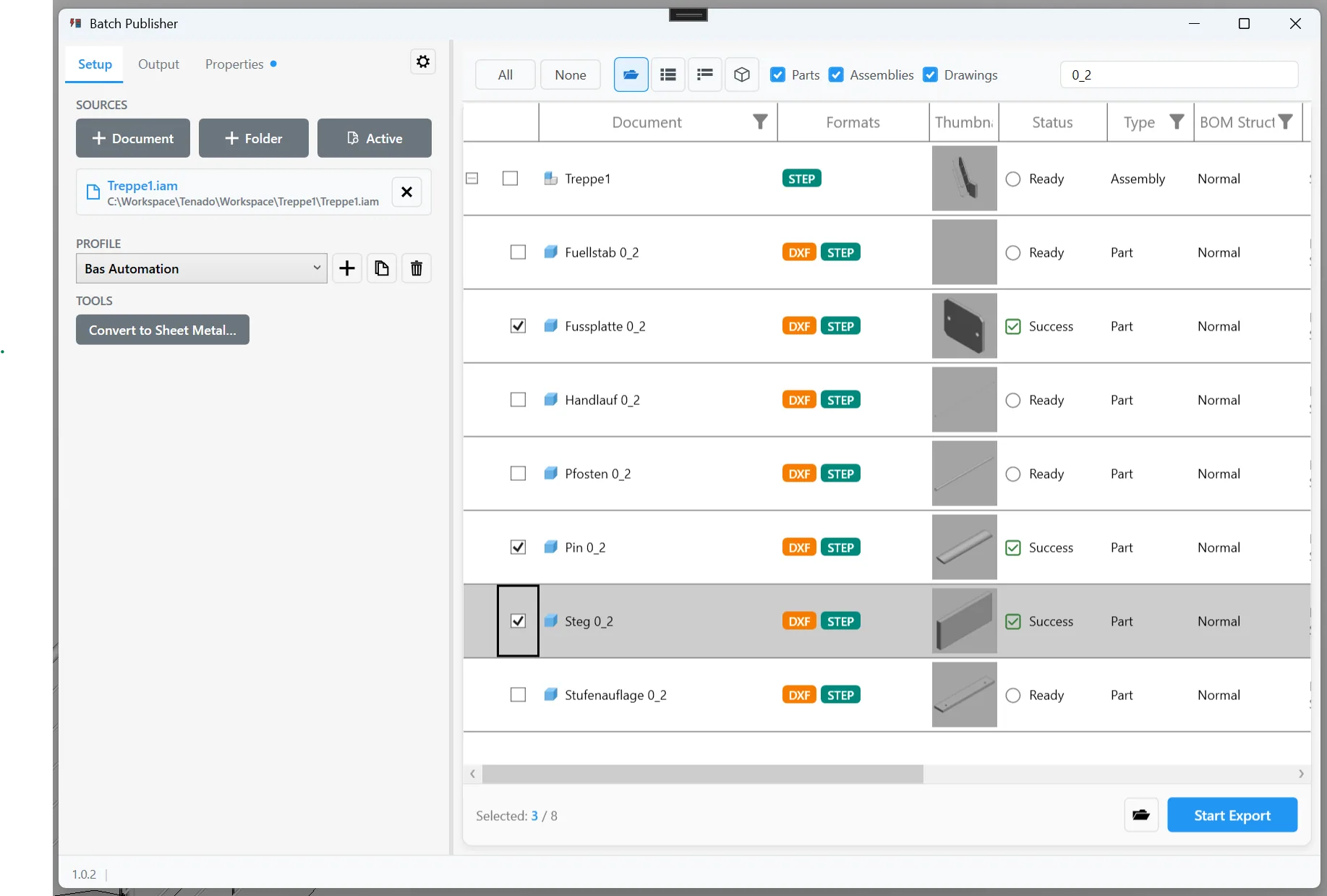
Batch Publisher is a free Autodesk Inventor add-in from Bas Automation Services for exporting groups of existing parts, assemblies, and drawings. Select documents from an assembly, a folder of drawings, or the active document, then run the export with a configured profile. It is suited to repeat jobs such as preparing drawing packages or neutral-format files for suppliers.
See the Autodesk Marketplace listing or the Bas Automation Services product page for current product details.
Select the documents to export
Batch Publisher scans an assembly's reference tree when you add a document. You can also add a folder of drawings or the active Inventor document. The document browser presents the results as a tree, flat list, or BOM-style view. Filter by document type or column, then choose the files for the run. Configurable columns can show thumbnails, flat-pattern previews, bounding-box dimensions, and custom iProperties.
For models with associated drawings, the add-in can search configured paths and select a matching drawing. This helps when a batch needs the existing drawings for an assembly.
Choose formats and output rules
The Autodesk Marketplace describes PDF and DWG export for drawings, STEP for parts and assemblies, and flat-pattern DXF for sheet metal parts. Bas Automation Services' v1.1.12 Batch Publisher update documents 3D PDF export for parts and assemblies. PDF settings include combining sheets, exporting colors as black, and setting vector resolution. DXF and DWG exports can use Inventor export configuration (.ini) files.
Profiles control where files are written: beside the source, in a relative subfolder, or in a custom folder. Output can be organized into subfolders by document type, format, material, or thickness. For files that already exist, choose whether to overwrite, increment the name, or skip them.
Name files and reuse profiles
File name templates can use values such as part number, revision, description, material, thickness, length, date, and a counter. You can also insert a custom iProperty. Numeric placeholders support configurable units and decimal formatting.
A profile saves the export configuration so it can be selected for another run. Profiles can be exported to JSON and imported on another machine, which helps teams reuse the same naming and output rules.
What Batch Publisher does
Batch Publisher does not generate drawings from models; Bas Automation Services' separate Drawing Maker add-in creates them, and Batch Publisher can export those drawings once they exist. For documentation and the current download, use the Bas Automation Services product page.