Bento is an After Effects script for building multi-panel layouts. It creates a grid guide, then converts each box into a pre-comp with a matte. This workflow suits motion designers who need separate footage or artwork in each panel.
Shape the grid
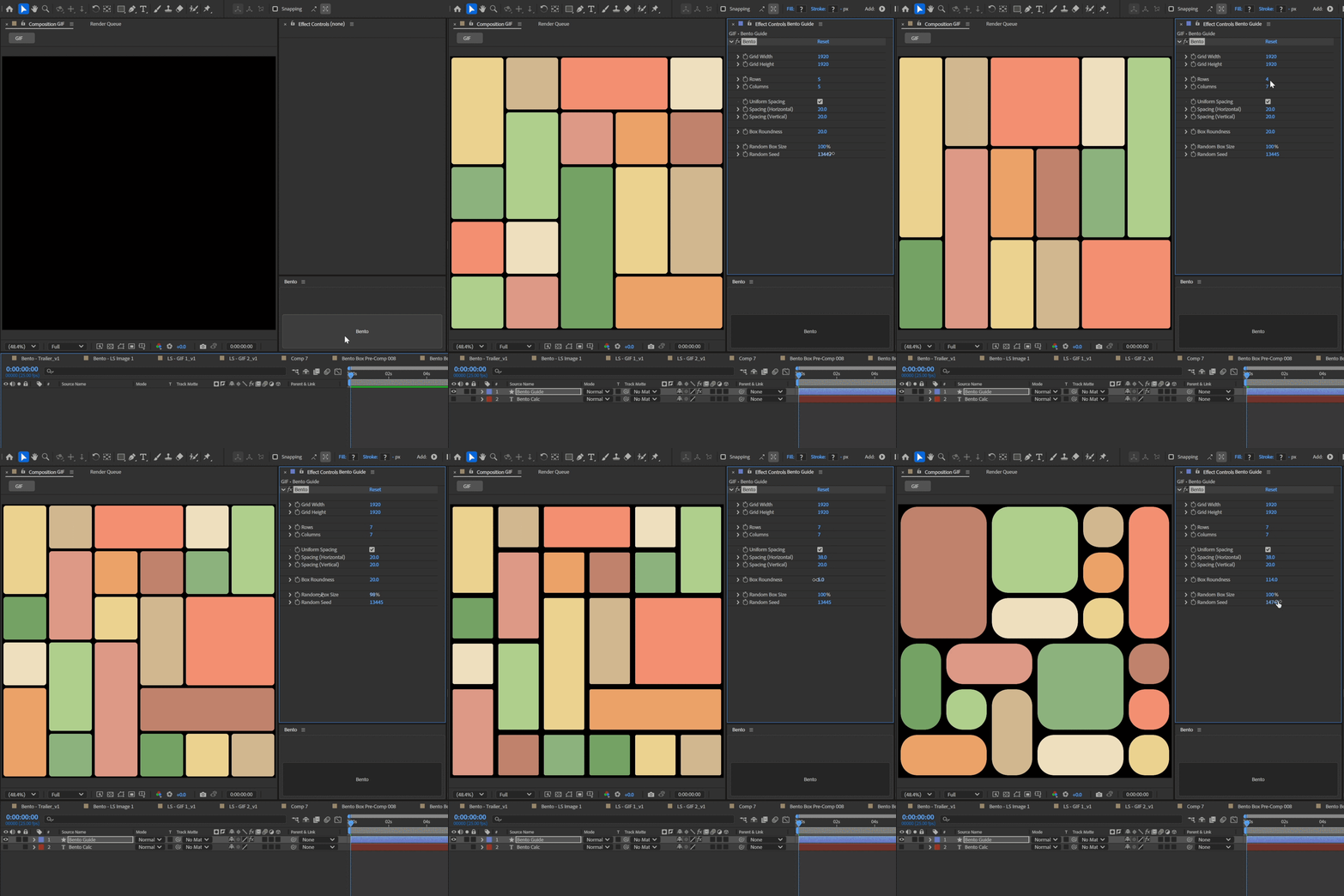
Grid width and height default to the composition size, and you can change them. Set rows and columns, choose uniform spacing or separate horizontal and vertical spacing, and adjust roundness for all boxes. Use Random with a Random Seed to explore layouts. Lower Random Box Size for a more uniform grid.
Turn boxes into media slots
When the layout is ready, select the Bento Guide layer and click the Bento button. Bento converts the boxes into pre-comps with mattes; then drag your assets into those pre-comps.
Compatibility and licensing
Bento is listed as compatible with After Effects 2023, 2024, 2025, and 2026. It also has a license-type selector. Bento's EULA grants one copy; additional copies or users require an appropriate license for each copy and user. aescripts' general license guidance allows a Single User License on up to two computers or accounts owned by one user, provided they are not used at the same time, unless the product's terms state otherwise. Floating licenses can be installed on multiple computers on the same network, require the Floating License Server, and allow one user per license at a time. Confirm the license terms shown for Bento at checkout.