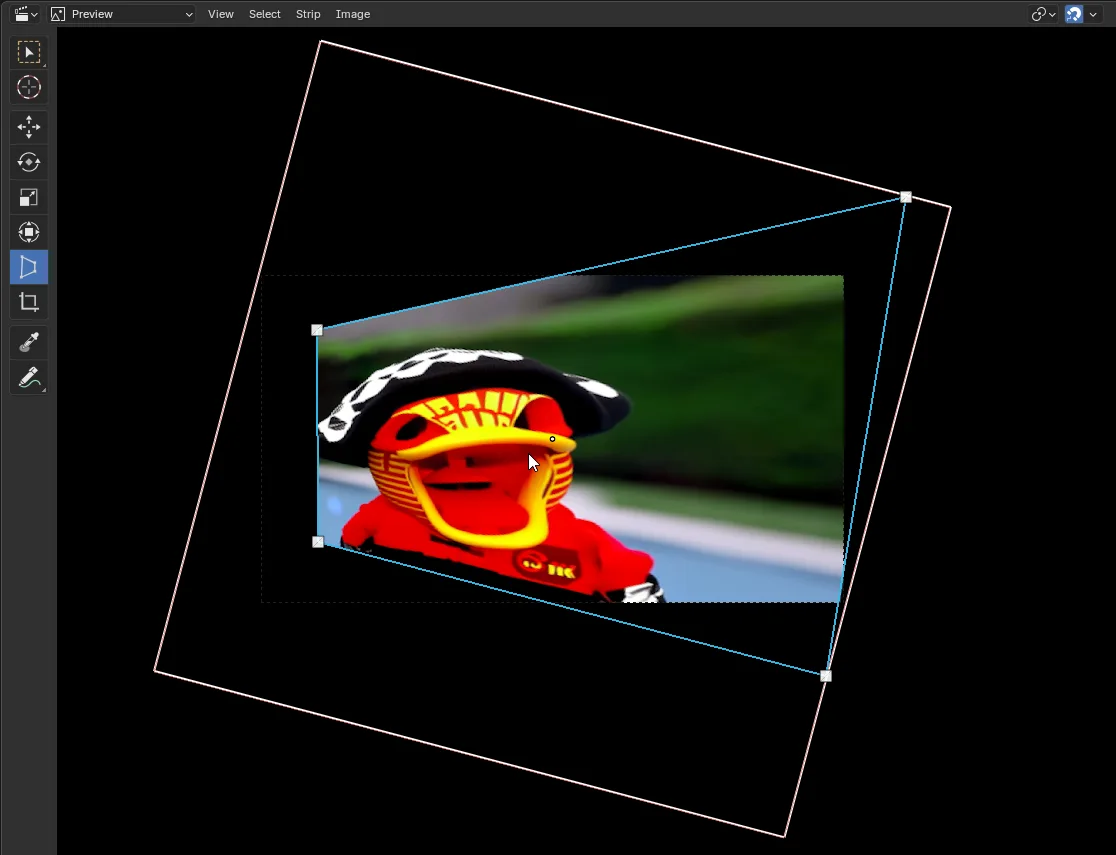
BL Perspective Transform adds four-corner perspective distortion to strips in Blender's Video Sequence Editor (VSE). Drag the corner handles in the preview to reshape a strip; the adjustment carries through Blender's normal strip rendering pipeline.
Adjust perspective in the VSE preview
The add-on places four draggable handles over the selected visual strip. Move each corner to create the perspective shape you need, then keyframe individual corners when the effect should change over time. The tool is available from the VSE toolbar, a menu, or the default P shortcut.
Because the transform is stored as a Corner Pin node in a compositor strip modifier, it is part of the rendered sequence. It also works alongside a strip's scale, rotation, mirroring, and crop settings.
Works with different visual strips
BL Perspective Transform supports image, movie, text, color, and scene strips, among other visual strip types. That makes it useful for placing footage, titles, or graphic elements into a perspective shape while editing a sequence in Blender.
Blender version and installation
The extension listing identifies version 2.2.3 for Blender 5.0 and newer. The Corner Pin node used by the strip modifier is the reason for the Blender 5.0 requirement. You can get the add-on from the BL Perspective Transform listing on Blender Extensions. To install a downloaded ZIP file, follow Blender's Install from Disk instructions.
The add-on is developed by usrname0 and is distributed under the GNU General Public License version 3.0 or later. Its source repository is available on GitHub.