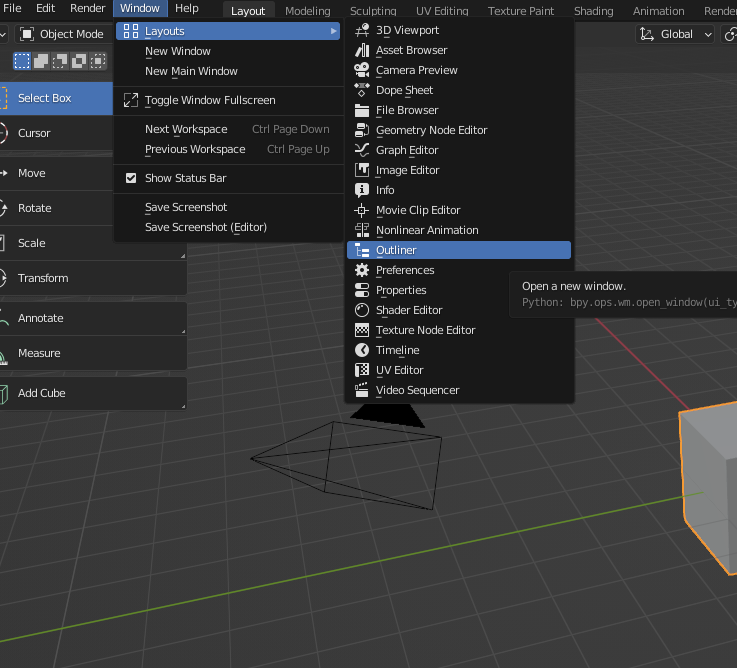
Blender Multi-Window Tool is an add-on by Me Bman for opening Blender editors in separate popup windows. Choose an editor from the Window menu, set the window size, and assign a hotkey if you want to open it quickly. This can help when you need an editor beside your current workspace without changing its layout.
Editors you can open
The add-on supports a broad set of Blender editors, including the 3D Viewport, Asset Browser, Camera Preview, Dope Sheet, File Browser, Geometry Node Editor, Graph Editor, Image Editor, Movie Clip Editor, Nonlinear Animation, Outliner, Preferences, Properties, Shader Editor, Texture Node Editor, Timeline, UV Editor, Console, Text Editor, Spreadsheet, and Video Sequencer.
Install and open a window
- In Blender Preferences, open the Add-on section, choose Install, and select
multiwindow_tool_2.0.0.zip. - After installing and enabling the add-on, open Topbar > Window > Layouts.
- Select the editor you want to open as a popup window. You can assign a hotkey and choose the window size.
Compatibility and license
Me Bman recommends Blender 3.0 or newer. The Superhive product listing names Windows and Linux as compatible platforms and lists Blender versions from 2.8 through 4.3. It identifies the license as GPL. The listing does not cover Blender releases after 4.3, so check the developer's page for newer compatibility details.