Bone Damped Track Batch adds Damped Track constraints to Blender armature bones in batches. It can target a selected bone chain or all bones, then assign constant or gradient influence. The add-on is designed for cloth, hair, and skirt chains, especially MMD-style rigs. The listed 3.6.0 release supports Blender 4.2 LTS and newer.
Choose which bones to affect
Target a selected chain or use the add-on's filters. These include all bones, the “green” bones that already carry constraints, and cloth or hair bones matched by keywords. You can set manual include and exclude keyword lists, or pick bones directly with an eyedropper in the 3D viewport. Keyword matching checks bone names and MMD Japanese and English names.
A live preview highlights the bones that would be affected, so you can inspect the target set before applying the batch.
Control influence along the chain
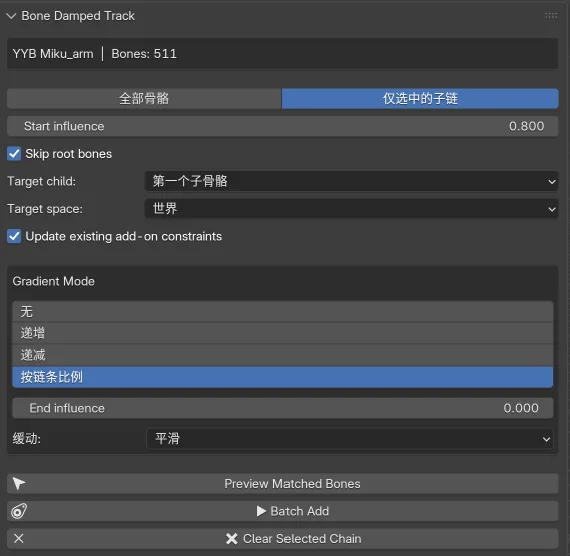
Influence can stay constant, increase or decrease by a depth step, or change proportionally with chain length. For proportional influence, the available curves are linear, ease-in, ease-out, and smooth. These choices let you keep influence even or create a gradient along the chain without setting each bone individually.
Clean up add-on constraints
Bone Damped Track Batch manages only the constraints it created. Its one-click cleanup leaves hand-tuned constraints alone.
The project also has a Chinese-language version with the same features and a Chinese UI. Its GitHub repository includes the download information.