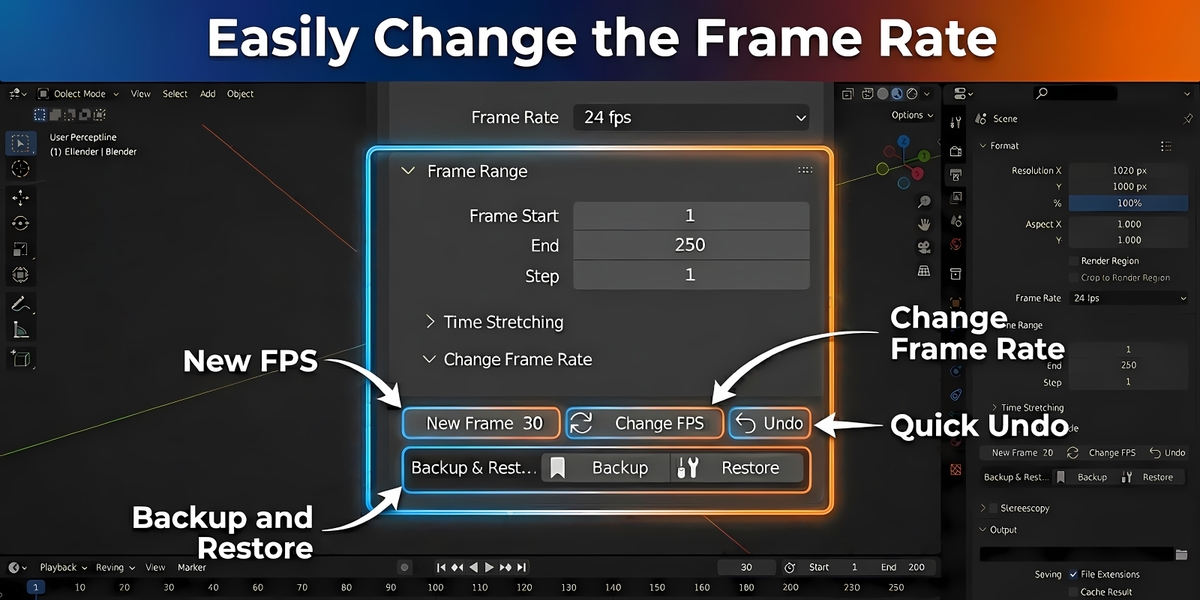
Change Frame Rate is a Blender add-on by Vikky3D for converting a scene’s frame rate without manually calculating time-stretch ratios or scaling frame ranges. You enter a new FPS value and click Change; the add-on handles the FPS, time stretching, frame range, and scene updates together.
Convert frame rate with one action
Use Change Frame Rate when a scene needs a new FPS and its animation duration should stay consistent. The Vikky3D product listing describes the conversion and its timing behavior.
Keep the animation duration consistent
The listing gives a 10-second animation as an example: it remains 10 seconds long after you choose a new FPS. That makes the add-on suited to frame-rate conversion where the intended duration stays the same. If you want to change the animation’s playback length as well, check the resulting scene against that goal.
Undo and restore scene settings
Change Frame Rate includes a Smart Undo to revert settings if you change your mind. Its backup system can store and restore scene settings while you experiment. These options are useful when trying a conversion and deciding whether to keep the result.
Blender support and location
The add-on appears in Blender’s Output Properties panel. The product listing marks it as Blender Extension compatible and gives a supported range of Blender 3.6 through 5.0. It identifies version 1.0.1 and a GPL license. Check the current listing or documentation for details that apply to your Blender release.