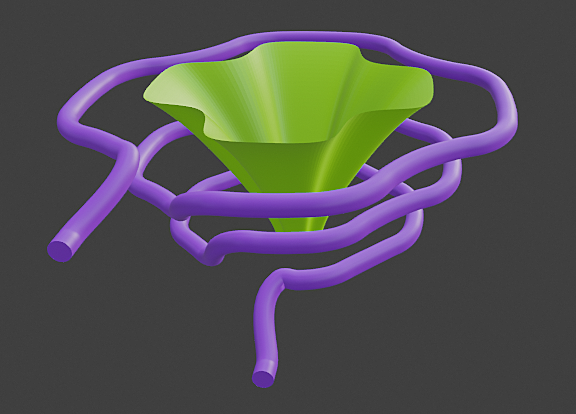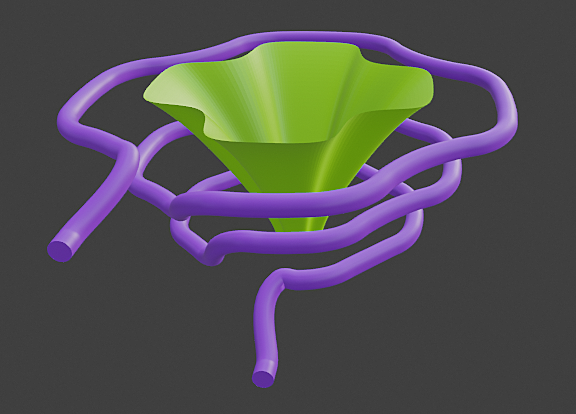
Conformal Channel (Old Version) is a Blender add-on that creates channels around a mesh boundary. The channel geometry can be used in Boolean operations, including cooling passages in molds or other structures. The product listing identifies Blender 2.8; the product documentation does not state compatibility with newer Blender versions.
What the add-on creates
Each run creates several objects in the Scene Collection for the active mesh. The CentralCurve guides the channel path and should remain entirely inside the selected mesh. ConformCurve is the curve output, hidden by default, which you can edit manually. ConformCurveMesh is the mesh output to use for Boolean operations. The cross-section is circular by default; the documentation describes changing it through the Bevel object assigned to ConformCurve.
Install and generate a channel
The instructions target Blender 2.8. Install the downloaded conformal_channel.py file from Preferences > Add-ons, enable the add-on, and save preferences. In the 3D View, select a mesh and open the conformal channel tab in the sidebar. Choose the mesh in the Obj field under Channel Properties, set the channel values, and click Create Channel. A new run deletes the previous generated objects for that mesh.
Adjust the channel path
Channel properties control the input and output locations and directions, cross-section radius, distance from the mesh surface, and whether the connection is reversed. The surface distance can be set inward or outward. Central-curve subdivisions determine the number of coils. Curve subdivisions control lateral conformity: higher values increase conformity and point count, which can make manual editing harder. The documentation describes Bezier curves for fine editing, NURBS for smooth curves, and POLY for rough curves. HandleType applies to Bezier splines.
Troubleshoot the generated path
If the add-on does not create a channel around the intended object, choose that mesh in the Obj field and click Create Channel again. For an irregular path, check the cen_end1 and cen_end2 values. They position the CentralCurve, which must stay inside the selected mesh; the documented defaults are 0.1 and 0.9 relative to the mesh bounding box.
Compatibility and license
The listing specifies Blender 2.8 and a GPL license. It does not confirm support for later Blender versions, so check with the creator before relying on this older add-on in a newer setup. The product documentation covers installation and channel properties, while its FAQ explains two common generation problems. Tom Paul's add-on overview includes pictures.