Cool Addons Menu by Kito Studio is a Blender add-on for finding other add-ons with panels in Blender's N-Panel. It gathers those add-ons in one list, where you can open a panel or go straight to its preferences instead of browsing vertical tabs.
Browse add-ons from one menu
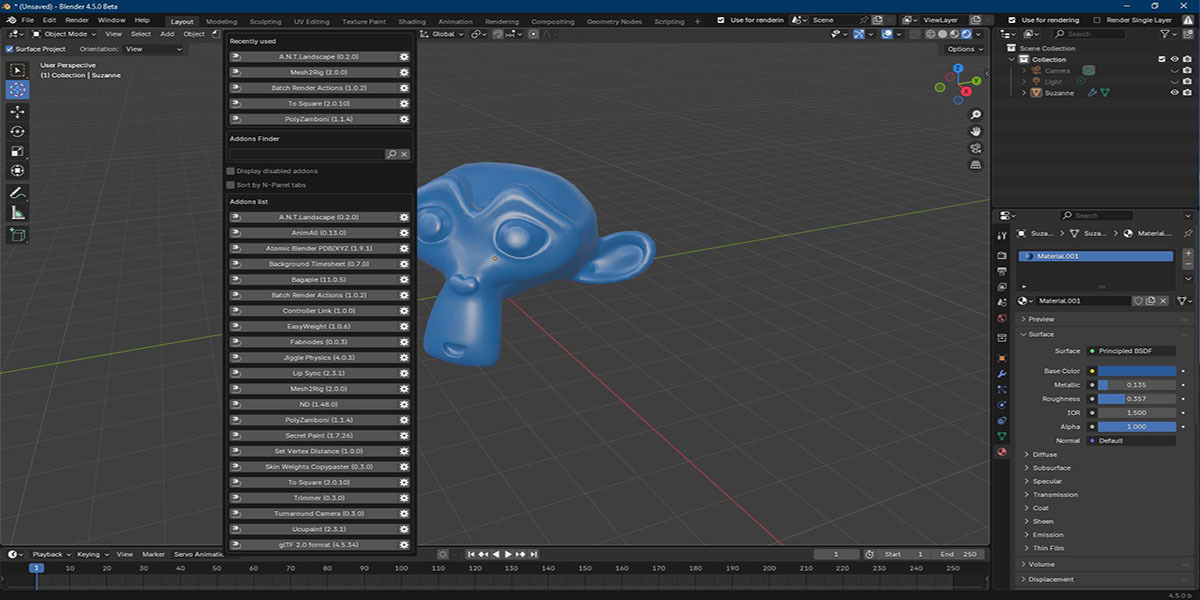
The list is alphabetical and shows each add-on's version. It updates when you install, uninstall, enable, or disable add-ons. Turn on tab sorting to group entries by their N-Panel tab; the tabs are listed alphabetically, with an add-on count beside each one.
Click an add-on's name to open its panel. Use the gear button beside it to open its preferences. The menu can stay open while you work, or close with Ok, Cancel, or a click outside it. The dedicated button in Blender's 3D View header opens the menu again.
Search and revisit recent add-ons
Type part of an add-on's name in the finder and press Enter or use the find button. The list filters to names containing that text, and the x button clears the search. The list can also be collapsed when you want more room.
After you choose an add-on through the menu, a Recently used area appears with the last five you opened. From there, you can return to an add-on's panel or preferences. Version 2.0 adds Shift+Alt+K to switch between the last two add-ons used.
Installation and compatibility
Kito Studio's documentation says to drag the CoolAddonsMenu2_0.zip file into an open Blender session without unzipping it. It says no further configuration is needed. The documentation describes accessing the menu from a button in the 3D View header.
The add-on lists tools that have an N-Panel panel. Disabled add-ons are hidden by default; enable Display disabled addons to include them. The documentation notes that some entries may appear without a usable panel, and an add-on's panel may not work in the current Blender mode. If the panel does not work in that mode, switch to one it supports.
The product listing gives Blender compatibility as versions 4.1 to 5.3. Check the listing for current compatibility details before installing.