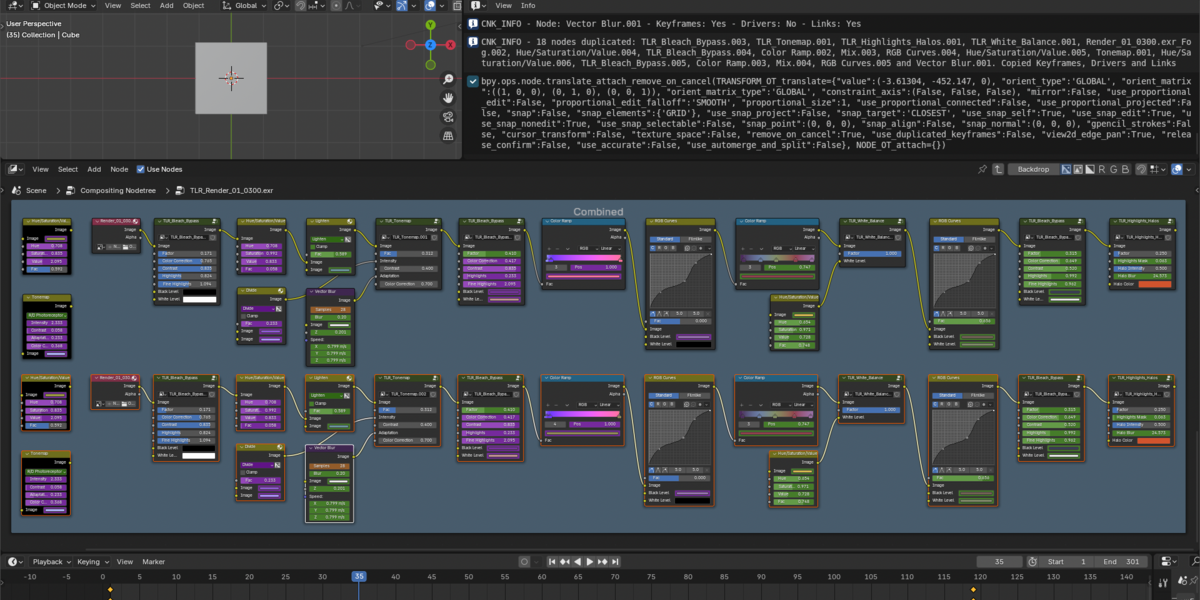
Copy Nodes Keyframes is a Blender add-on for duplicating nodes or copying them to another node tree with their keyframes, drivers and links. It avoids manually copying keyframes and editing driver variable paths when duplicating animated nodes. You can duplicate several selected nodes at once. The Superhive product listing says drivers inside groups are fixed automatically when needed.
Duplicate nodes or copy them to another tree
Use the duplicate commands when you want another copy in the current node tree. For duplication, the product listing gives Ctrl+D for regular duplication and Ctrl+G for linked duplication; the product FAQ lists Ctrl+D for both methods, plus Ctrl+Alt+D to preserve input links in the old method. For copy/paste, the listing gives Ctrl+F to copy selected nodes and Ctrl+Alt+F to paste them; the documentation says these options are available only with the new method. Use the corresponding OSKey shortcuts on macOS. You can change shortcuts from the add-on panel.
The copy/paste tree restriction prevents pasting into the same node tree or any node tree nested inside it. Duplicate nodes within a tree; use copy/paste to move a setup to another tree.
Settings and compatibility
Find the settings in the Sidebar of a Node Editor, including the Shader Editor, Geometry Nodes Editor and Compositing Editor. Press N to open the Sidebar if it is hidden. It contains buttons for the add-on's actions, shortcut settings and options such as replacing the last link or showing detailed node information.
The product page description lists Blender 3.3 to 5.2, while its details field lists 4.2 to 5.3; the documentation says Blender 3.3+ and records Blender 5.3 compatibility in its changelog. Check the current listing and documentation for your Blender version before installing. The add-on is listed under the GPL license.