Studio Library, listed as Mini Studio Library on Superhive, is a Blender add-on from Nascore Entertainment for storing and reusing keyframes. It saves keyframes from selected objects, or from the active object when none are selected, as JSON files in a folder you choose. The product documentation describes its file and paste controls.
Save keyframes as files
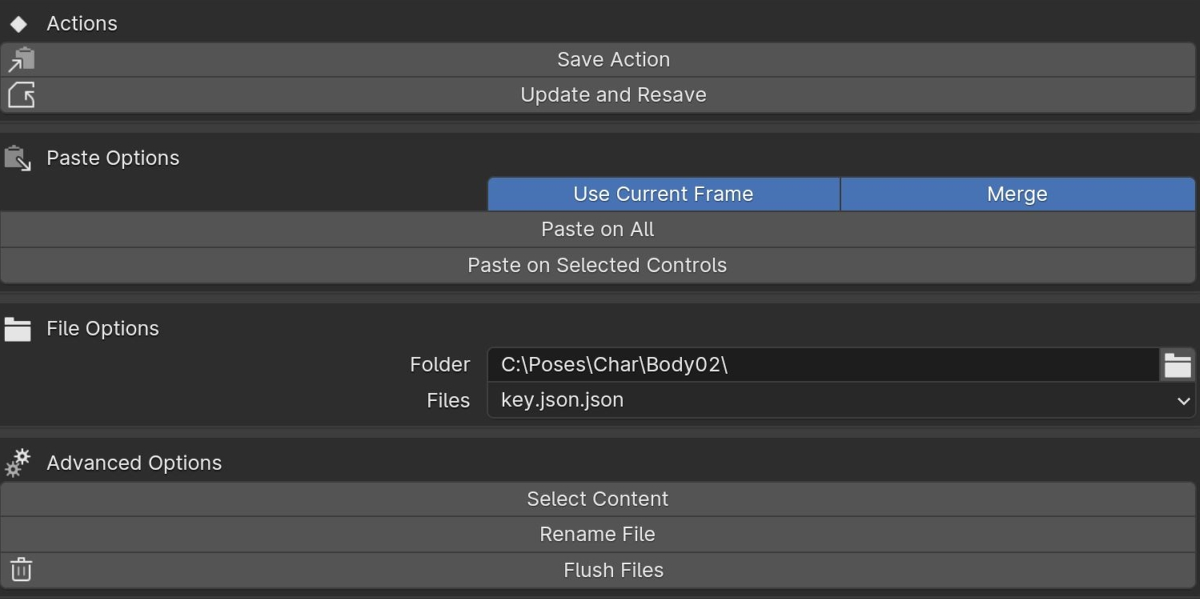
Choose a directory in the Keyframes Folder field by entering its path or browsing your files. Studio Library saves keyframes there as JSON files. The Keyframes Files menu updates automatically to show files in that folder.
Choose how to paste keyframes
Use Current Frame starts pasted keyframes at the current frame. When it is off, the keyframes keep their original frame positions. With Merge enabled, pasted keyframes combine with existing keyframes. With Merge off, existing keyframes are replaced, so check this option before pasting.
- Paste on All applies the selected keyframe file to all objects.
- Paste on Sel Ctrls applies it to selected bones of the active object.
- Select Content selects the bones and objects included in the selected file.
- Rename File renames the selected file. Delete Files removes all keyframe files in the Keyframes Folder directory.
Compatibility and license
The Superhive listing names Blender 3.0, 3.1, 3.2, 3.3, 3.4, 3.5, 3.6, and 4.0. It does not establish support for later Blender releases. The listing identifies the license as GPL without specifying a version. No add-on release version is shown.
The Superhive listing says not to buy the add-on there and directs visitors to Nascore Entertainment's page for more information.