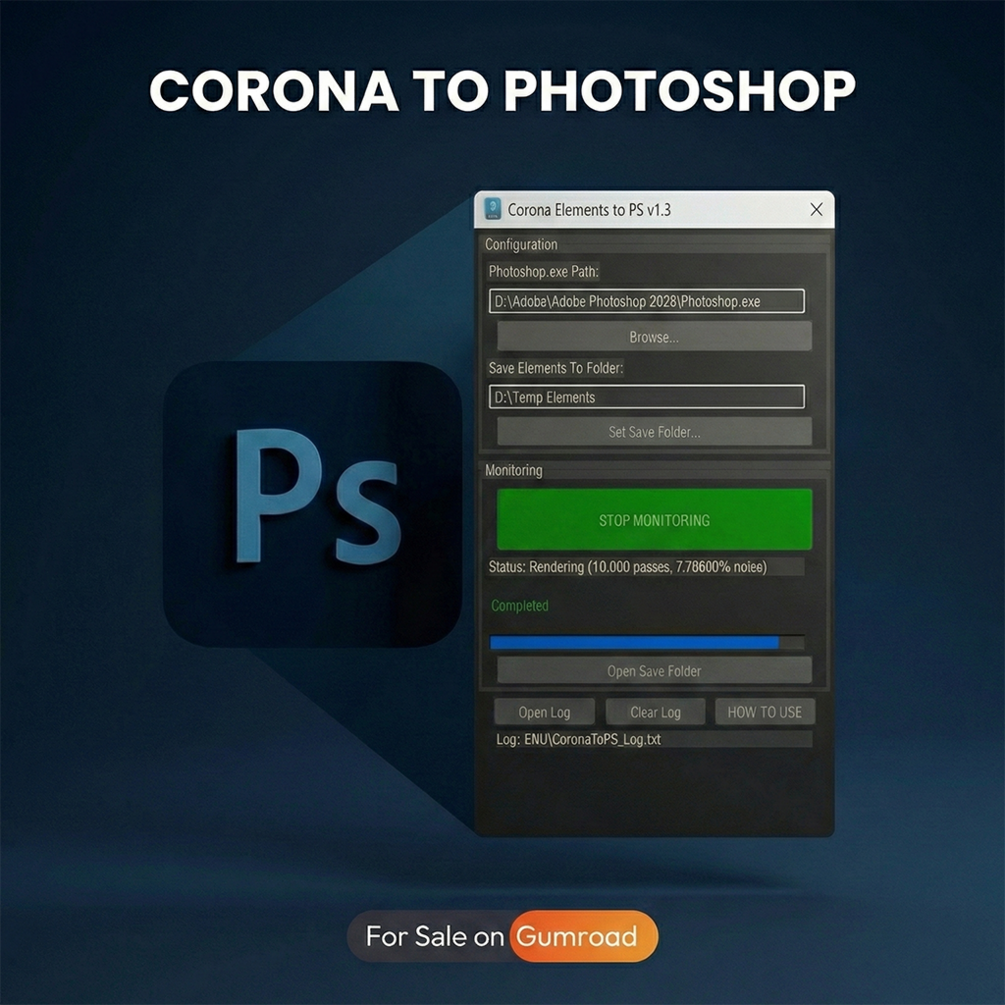
Corona Elements to Photoshop Automator is a 3ds Max workflow script that sends Corona render elements into Photoshop after a render. When the monitored render reaches its pass or noise limit, the script saves the elements as 16-bit TIF files with alpha, then launches or focuses Photoshop and stacks them into one document. The layers are grouped in a set named after the 3ds Max scene.
Install the script and set its paths
Drag the MZP file into the 3ds Max viewport to open the install and uninstall window. After installation, find the tool under Main UI > Custom Tools in the Customize User Interface.
In the script’s GUI, choose the location of Photoshop.exe and the folder for the saved TIF elements. These settings are saved automatically in the 3ds Max ENU folder. Click START MONITORING; the progress bar then tracks render passes and noise levels as the render runs through F9 or Production.
Prepare the Corona render
Corona Render must be active, and the render elements you want to export must be added in the Render Setup dialog. The script saves those elements when the render reaches its pass or noise limit. If the expected TIFs do not appear, check the render-element setup and the selected save folder first.
After saving the files, the script runs a custom process in Photoshop to stack them into a single document. If Photoshop reports an error, the 3ds Max interface flags it in red and provides an Open Log button for more detail.
Compatibility and product details
The listing identifies version V1.3 and compatibility with 3ds Max 2026. It reports testing with Corona 13 and 3ds Max 2026. The script is designed to run without administrator rights, keeping its settings in the user’s ENU directory under AppData/Local. Support for other host versions is not established by these details, so check the developer’s pages before relying on it in a different setup.
This tool suits 3ds Max artists who render with Corona and use Photoshop to work with render-element layers. See the ScriptSpot listing for product details, and the Gumroad page for the download.