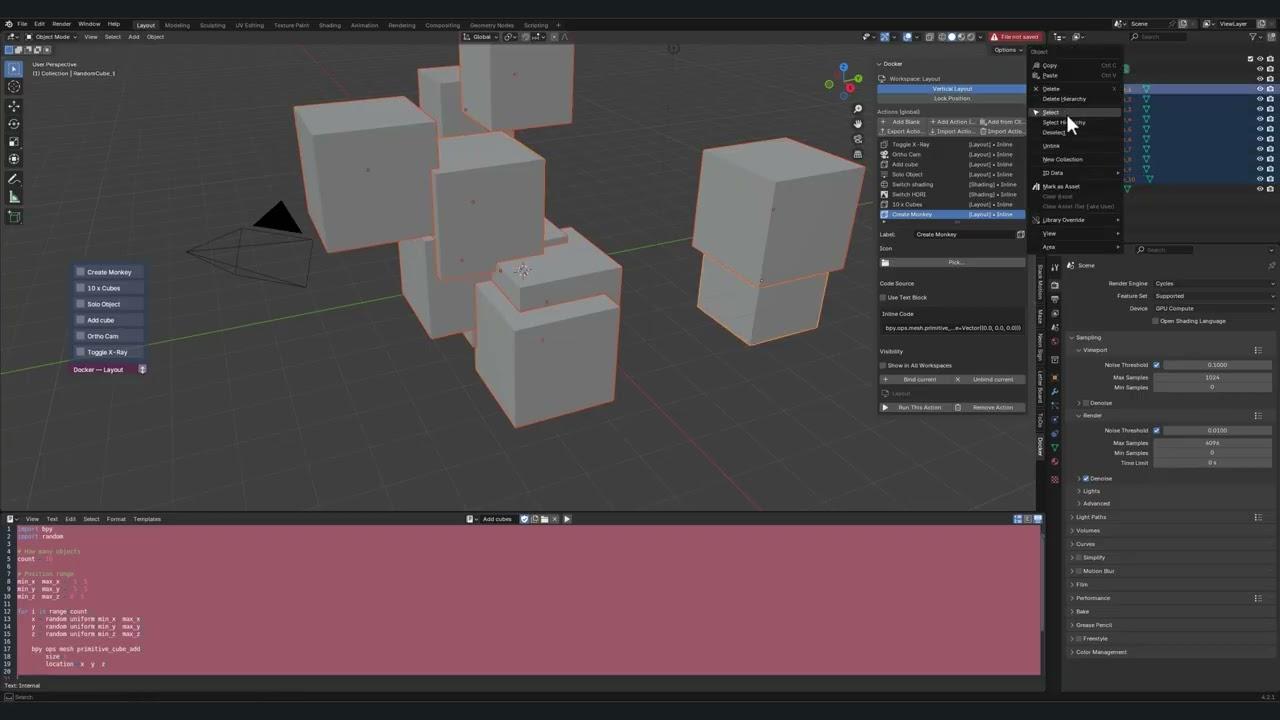
Docker is a Blender add-on by SkdSam that puts a draggable toolbar in the 3D View. Place it where it suits your workspace, choose a vertical or horizontal layout, and keep frequently used tools close at hand.
Create buttons for repeated tasks
Docker buttons can run Blender operators, inline Python, code from a Text datablock, web URLs, or paths to folders and external applications. Add a button from a Blender control's right-click menu, from Docker's tab in the N-panel, or by pasting code or an operator call from the clipboard. Python snippets run with access to Blender's bpy and context.
Custom tabs and search help organize larger button collections. You can limit buttons to selected workspaces, reorder them by dragging, and customize their appearance with themes, colors, and images. The developer documentation describes the available actions and controls.
Export and share toolbar setups
Docker can export actions, custom icons, and themes as a portable JSON package. You can merge an exported package with an existing setup or replace the current setup with it, which supports sharing toolbars or moving them between projects.