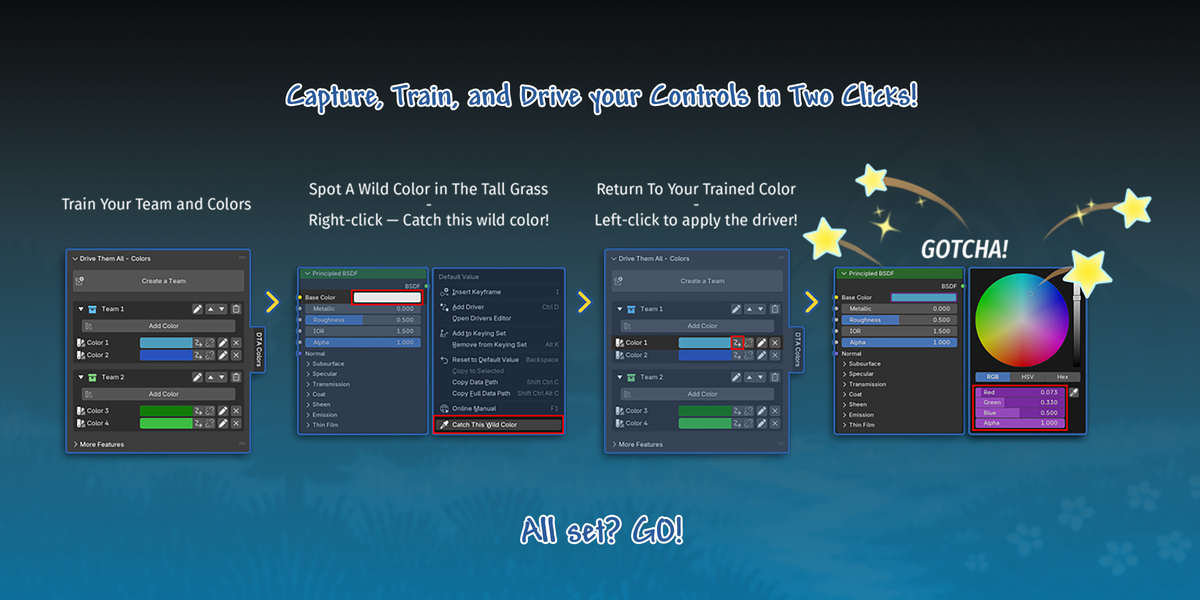
Drive Them All - Colors is the Blue Version of phaze974's Blender add-on for managing color drivers. It groups color entries in Teams and provides a capture-and-apply workflow, so you can assign or adjust color drivers without repeatedly switching between Blender tabs and menus. The product listing identifies version 1.0.0, GPL licensing, and compatibility with Blender 3.6 to 4.4.
How to apply a color driver
- Create a Team and add one or more Colors.
- Select the Color you want to drive, right-click it, and choose "Catch this Wild Color."
- Choose Apply Driver to link it. The listing describes capturing and driving a Color as a two-click workflow.
Manage Teams and Colors
You can rename Teams and Colors at any time. In v1.0, Remove Driver removes all drivers linked to that Color and their keyframes; use Undo (Ctrl+Z) if you only need to remove the last one in a group. Remove Color deletes the Color slot, its linked drivers, and their keyframes. Deleting a Team erases its Colors, drivers, and related keyframes. Reset DriveDex clears all Teams, Colors, drivers, and keyframes.
Version and documentation
The listing marks v1.0.0 as the Blue Version's initial and final release and says new features are for the Yellow versions. DTA-CC is listed for users who need all available driver types, Colors and Controls.
Setup and usage are identical to DTA-CC, but the documentation page directs Colors users to the Colors sections of the DriveDex Manual on GitHub. The product listing has the version and compatibility details.



