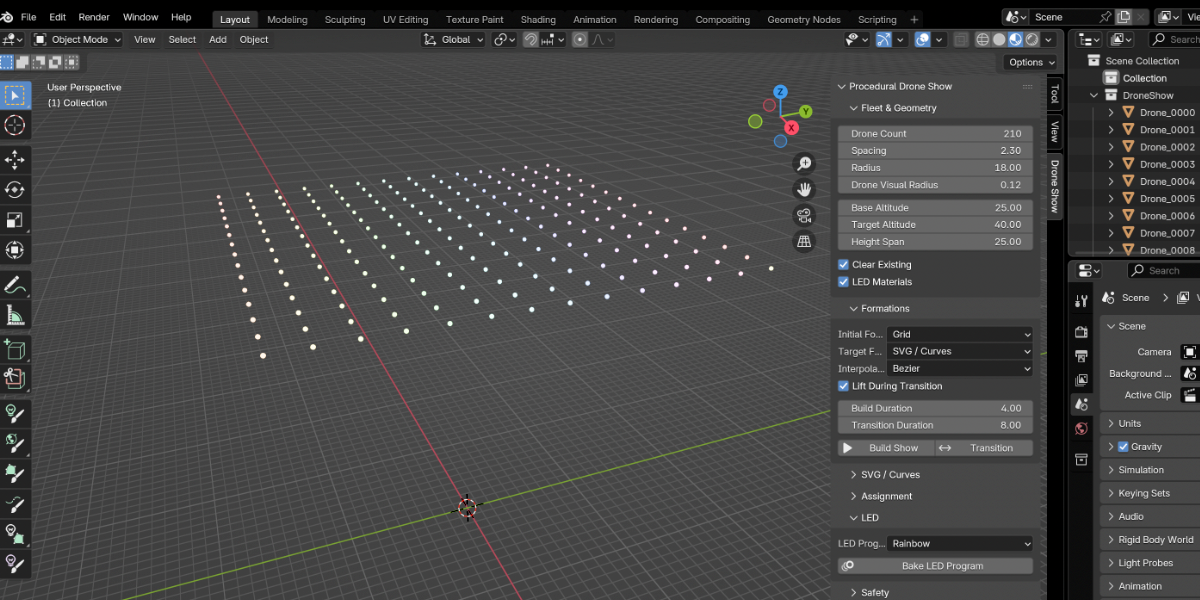
Drone Show is a Blender add-on that compiles animated drone shows into a generic export bundle and a MAVSDK Offboard runner for PX4 testing workflows. It extends the existing Blender drone show tooling and is intended for PX4 SITL, lab tests, research, and custom companion-computer pipelines.
What the export includes
Compiling a show produces show_bundle.json, with sampled positions, velocities, accelerations, and RGB values for the drones. The add-on also creates one CSV file per drone with time-based position and color samples. These files can be inspected, debugged, post-processed, or converted for vendor-specific formats.
The companion mavsdk_offboard_runner.py connects to one MAVSDK system per drone and streams Offboard setpoints for synchronized execution. Its target workflow uses PX4 systems; the generic bundle and CSV files leave room for custom integrations.
Build, inspect, and compile
The product documentation describes a real-time viewport preview for formation and altitude changes. Build Show and Transition To Target run as modal operations with progress feedback and Esc cancellation. It also describes a one-pass safety check with results cached in the panel for inspection. The product listing presents this as a basic check to run before export.
A typical workflow is to build and animate the show with the existing Blender tooling, review the safety check, then compile the bundle. Copy the exported folder to a machine running MAVSDK with network access to the PX4 systems. Before any live test, adapt and review the UDP ports, coordinate frames, estimator assumptions, arming logic, Offboard entry conditions, and failsafes for the setup.
Prototype scope and flight limitations
Drone Show is a prototype exporter, not a vendor-certified show compiler or a flight-authority-approved operational system. It does not automatically enforce the requirements for PX4 Offboard operation, including continuous setpoint streaming, valid state estimates, and correct Offboard-loss and RC-loss behavior. The runner and exported data need to be adapted, validated, and safety-reviewed before real-world use.
For the control requirements, see the PX4 Offboard mode guide and the MAVSDK Offboard API reference. The product documentation recommends ground testing and safety approval before outdoor or public demonstrations.