Light Director 2.0 is a Blender add-on for saving and restoring lighting rigs and World environments within one .blend file. Each setup captures the state of the scene’s lights and World, so you can switch back to a saved version after experimenting with a different look. The product listing describes it as a procedural, non-destructive system inspired by Houdini’s Solaris Render Gallery.
Manage lighting variations as setups
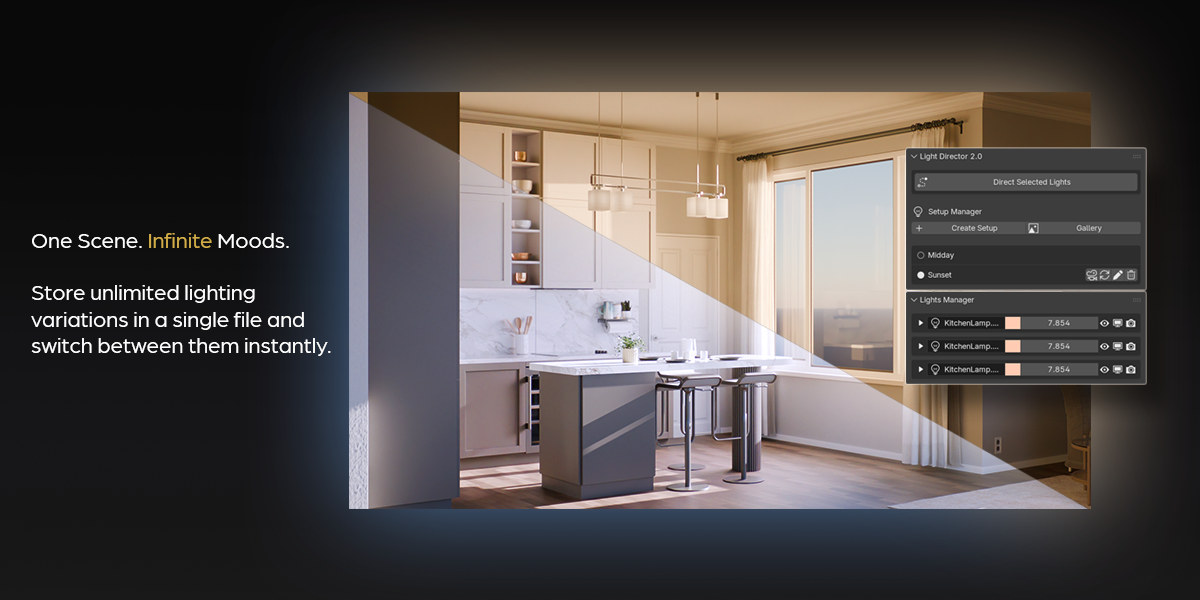
The Setup Manager stores scene lighting and World data in a managed list. Create Setup captures the current state; Update Setup replaces the saved state for the active setup. You can rename setups, which must have unique names, or delete them. The add-on stores light visibility, names, and transforms internally, so you can keep variations together without duplicating light collections or saving a separate file for each tweak.
Recall a look from its preview
The Gallery shows saved setups as thumbnails. Select a thumbnail to restore the corresponding rig, or use the camera control beside the active setup to make a preview. Taking a setup screenshot requires a saved .blend file and an active camera view. The add-on saves the cropped PNG in a Screenshots folder at the blend file’s location. A new screenshot for the same setup replaces the previous one.
Adjust lights from one manager
The Lights Manager lists lights in the current setup and lets you change properties without finding each lamp in the Outliner. Its primary controls include light name, color, and power. Visibility controls cover temporary viewport hiding, global viewport restriction, and render restriction. Expanded settings depend on light type and include conversions between Point, Spot, Sun, and Area lights, along with shape, shadow, beam spread, and color temperature controls.
The Direct command aims one or more selected lights at a target object’s origin. It requires at least one selected light and one selected non-light object. When the active object is not a light, the command uses it as the target.
Keep World settings with a rig
Switching setups reconstructs the saved World Node Tree, keeping Environment Texture or Sky settings with the corresponding lights. The developer documentation says basic inputs and links are saved for all nodes, while deeper property extraction is available for a documented list of node types. Examples include Sky Texture, Image Texture, Environment Texture, Mapping, Color Ramp, Math, Vector Math, and World Output. Check the documentation’s full list if your setup depends on a particular node’s detailed settings.
The product listing marks Light Director 2.0 as Blender Extension compatible and lists Blender 5.0, the Cycles and Eevee render engines, and the GPL license. Check the listing for current compatibility details before installing.