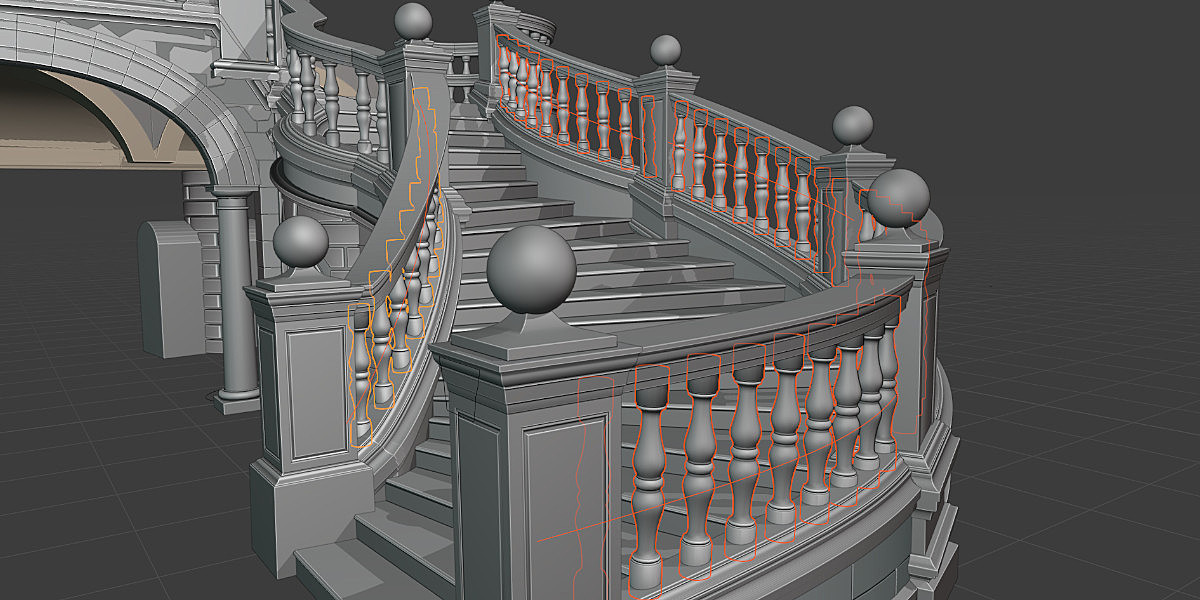
Dupli-Curve is a Blender add-on by Picto Filmo for distributing objects along a path. It places objects in random or ordered sequences from a collection, with adjustable spacing to keep them on the curve. The workflow suits tasks such as placing trees along a road or adding rivets and bolts to curved shapes.
Placement and conversion controls
Dupli-Curve provides several controls for shaping a distribution:
- Choose random or ordered objects from the collection of the first selected object.
- Adjust spacing between object pivots and randomize location, rotation or scale; settings update in real time.
- With Follow Curve enabled, Lock Up keeps instances vertical. Fill populates the curve and works well with objects symmetrical on the X axis. A Z lock also keeps objects vertical.
- Convert the result to one mesh or to separate instance meshes.
Setup in Blender
The product documentation says to install the downloaded ZIP through Blender Preferences in the Add-ons tab. The panel appears in the Tool tab beside the viewport. Select the object to distribute, Shift-select the spline, then use the Dupli Curve button. The collection option can draw objects from the first selected object's collection.
Object orientation affects placement: the documentation recommends putting the object's origin at its bottom so clones stay on the curve. The object should be Z-up; Dupli-Curve replicates it along its X axis. The documentation also warns that a very small spacing value can make the number of instances tend toward infinity.
Limits and version details
Dupli-Curve handles one spline at a time. It works with a one-element spline; additional segments will not be filled. It clones mesh data, and modifiers on source objects are not supported.
The product listing names version 3.2.0 and says it adds direct instance-count control and curve extraction from a mesh in edge-selection mode. The listing shows Blender versions 3.0 through 3.6 and 4.0 through 4.4, and identifies the license as GPL.