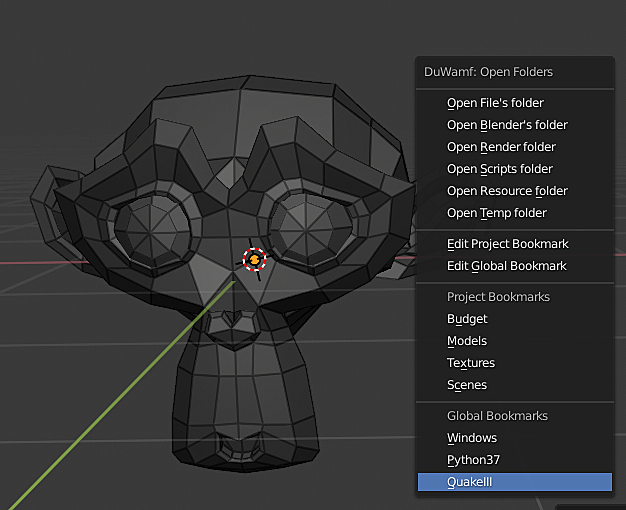
Duwamf+ is a Blender add-on for opening commonly used folders from a menu. It includes the folder shortcuts from DuWamf Free and adds editable global and project bookmarks, so you can keep useful locations available across Blender work or with a particular project.
Folders you can open
The menu provides access to:
- The current file's folder
- Blender's installation folder
- The render folder, if one is set
- The scripts and add-ons folder
- The user's Blender resource folder
- Blender's internal temporary folder
Duwamf+ has a floating menu and a submenu under Blender's File menu. When the floating menu is enabled, letters can call folders quickly. The developer documentation also explains how to assign a keyboard shortcut: add wm.call_menu in the keymap settings and enter FILE_MT_FoldersAccessMenu in the Name field. The documentation recommends Ctrl+Alt+Shift+O.
Global and project bookmarks
Global bookmarks are stored in the add-on's folder. Project bookmarks are stored alongside the currently open .blend file. You can edit either set. If a project has no bookmarks file, Duwamf+ creates one in that project's folder.
Blender version details
The Superhive listing's Blender Version field names releases from 2.79 and 2.8 through 3.5. Its overview specifically mentions 2.79 and 2.80, and its v1.2 release note mentions fixes for the 2.8x API. The listing is dated over seven years ago and does not name newer Blender releases, so check the product listing and documentation for compatibility with your version. The listing identifies the license as Creative Commons; consult it for the applicable terms.