Easy Sky is a Blender add-on from Techqon core for saving and switching HDRI presets in the World settings. Load an environment image, adjust its lighting, then apply saved setups to compare how different environments affect a scene. The documentation lists Cycles and Eevee as compatible render engines. See the Easy Sky product listing for its Blender version range.
Manage your HDRI setups
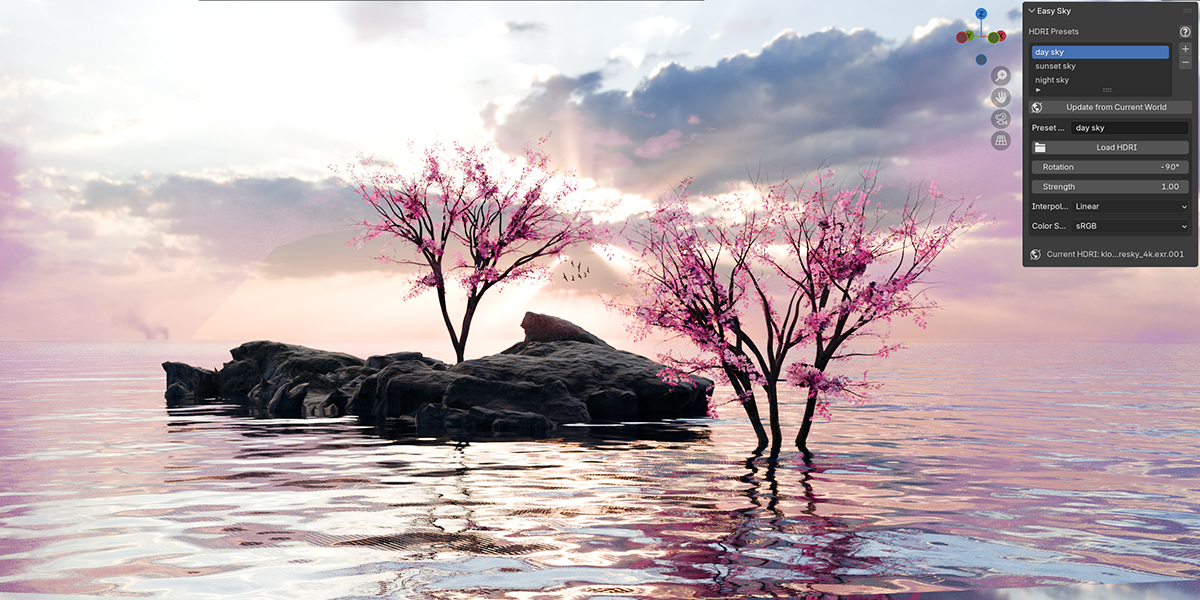
Easy Sky keeps environment presets in a panel under Blender's World Properties. It is useful when you want to compare lighting moods or reuse a setup across scenes without rebuilding each World configuration. The add-on manages HDRI files you provide; its documentation says image files are not included.
Create and switch presets
- In World Properties, click the
+button to add a preset. - Click
Load HDRIand choose an environment image from your computer. The selected image is applied to the current World. - Adjust the lighting settings for the look you want, then save the setup as a preset.
- Select a saved preset to apply it again while comparing scene lighting.
The product FAQ says presets are stored with the .blend file unless you remove them manually. It lists .hdr and .exr as examples of HDRI files you can load. See the product FAQ for those details.
Adjust lighting settings
Rotation changes light direction, while strength adjusts lighting intensity. Interpolation controls texture quality; the documentation recommends Cubic. It describes sRGB as the usual color-space choice for HDRIs. Easy Sky changes World lighting and, according to the product FAQ, leaves render settings untouched.
Install Easy Sky and check Blender support
Before installing, ask the developer which range applies to your Blender release: the product listing specifies Blender 4.2 through 4.5, while the product documentation says Blender 3.0 or newer. To install, download the ZIP from the product page, open Edit > Preferences > Add-ons > Install, select the ZIP, install and enable Easy Sky, then open World Properties. The product page also links to a video tutorial.