How Eevee 360 creates panoramic output
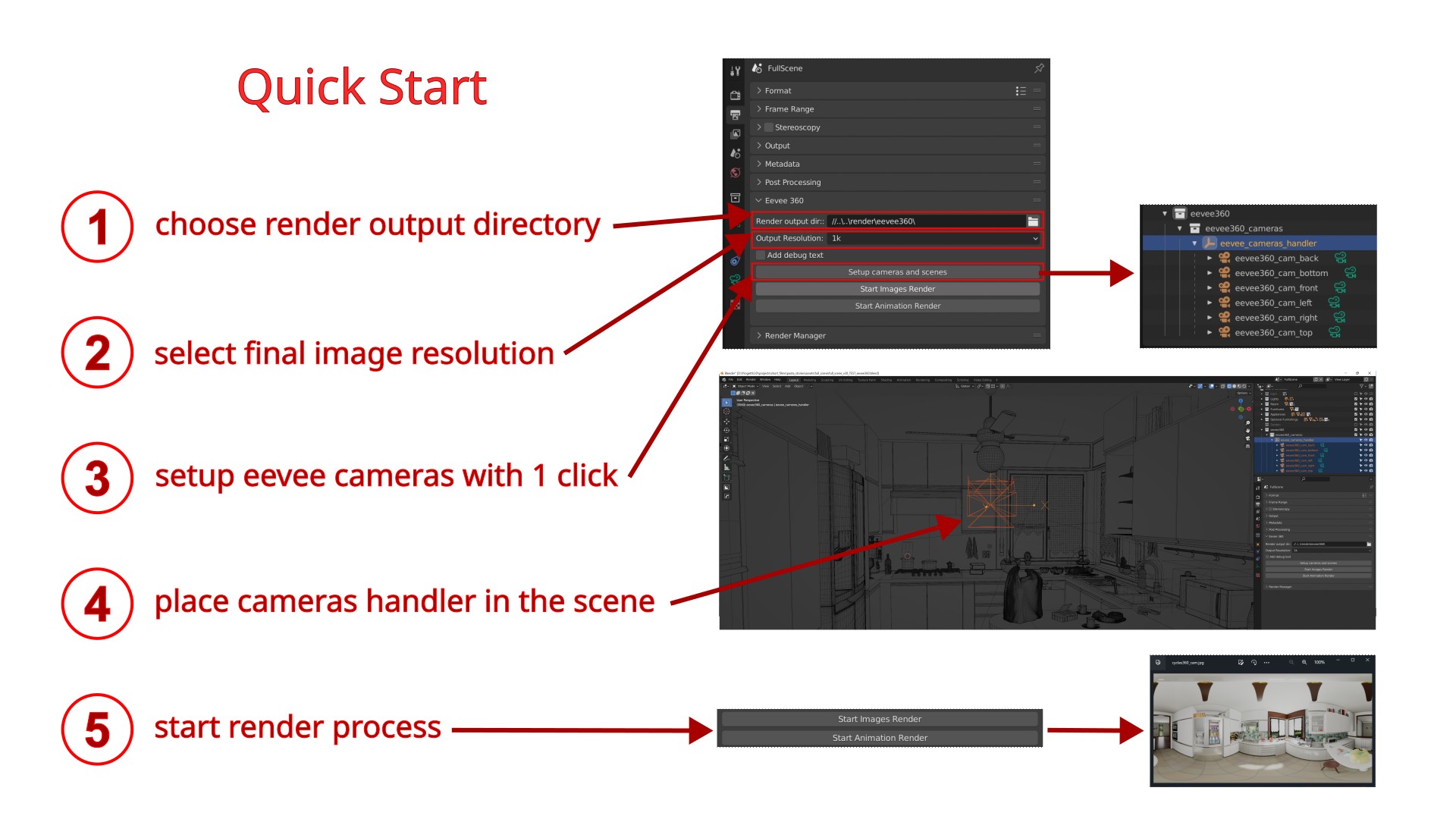
Eevee 360 is a Blender add-on from JSoftWorks for panoramic and dome rendering with EEVEE. Because Blender's EEVEE engine does not natively support panoramic cameras, Eevee 360 renders a six-camera cubemap with EEVEE, then uses a Cycles pass to stitch it into the selected projection. A single-click setup manages camera placement and resolution scaling. The product listing describes support for stills and animation image sequences, with output up to 16K; direct video-file output is unsupported.
Projection options and Blender support
Available outputs include 360° equirectangular mono, 180° mono, a skydome that points 180° upward, and custom immersive dome formats. Version 1.6.1 adds an experimental Tilted Dome preset with square 1:1 output and a 65° upward camera tilt. Because the preset is marked experimental, check that its projection fits your delivery requirements before relying on it.
JSoftWorks lists Blender 2.93 through 5.1 as tested and working. Version 1.6.1 updates engine identification for the EEVEE architecture in Blender 5.0 and later, and for the modern Blender Extensions system. The documentation page links to the developer's usage instructions.
Animation and stereo limits
For animation, render an image sequence such as PNG, JPEG, or EXR. Direct output to a video format such as FFmpeg Video is unsupported and causes a setup error. Compile the finished image sequence into a video afterward.
Eevee 360 is designed for monoscopic 360° rendering. It does not create stereoscopic left-eye and right-eye output, so it will not meet a project requirement for 3D stereo panoramas.
Fixing seams and refreshing a reopened project
Seams can appear when effects vary between the six camera views. The product FAQ names Screen Space Reflections, Ambient Occlusion, and Bloom as examples. It recommends baking indirect lighting with an Irradiance Volume and reflections with a Reflection Cubemap. Disabling Bloom and Depth of Field can also help.
After reopening a saved Blender file, click Setup cameras and scenes before rendering. The add-on loses its internal settings when Blender closes. The FAQ says running setup again refreshes those settings without duplicating objects.