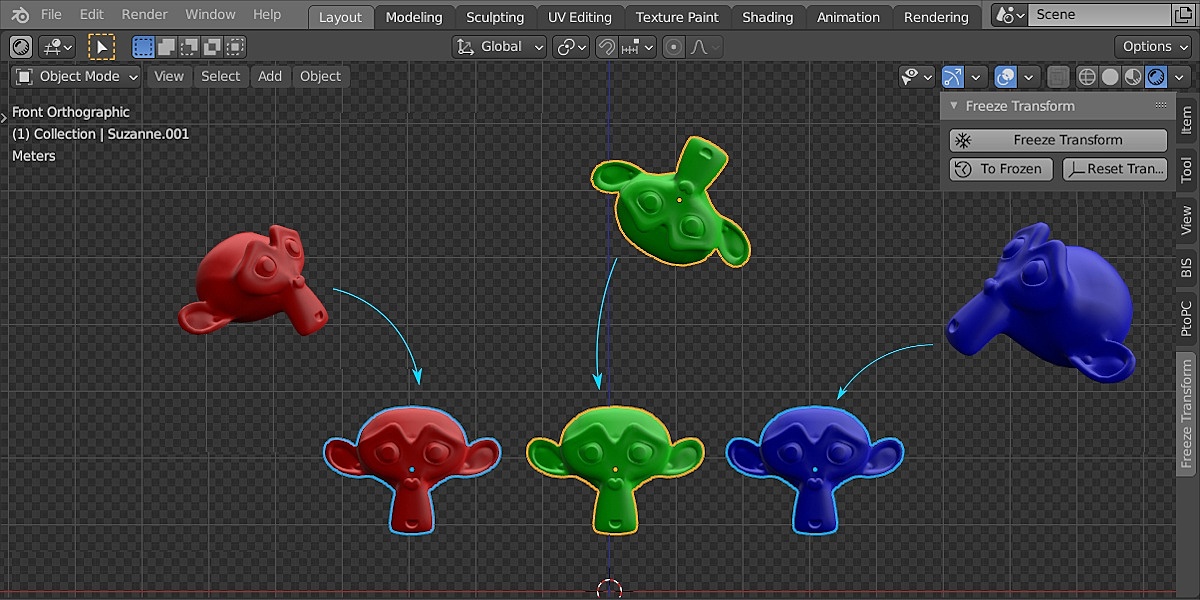
Freeze Transform is a Blender add-on by Nikita Akimov for saving and restoring object transformations. Its Freeze Transform button stores the selected object's current world position, rotation, and scale. After moving, rotating, or scaling the object, use To Frozen to return it to those saved values.
Save and restore object transforms
- Select one object or a group of objects in the 3D Viewport.
- Choose Freeze Transform to save the selected objects' current world transformations.
- Make changes to their position, rotation, or scale.
- Choose To Frozen to restore the saved transformations.
Find the controls and shortcuts
Open the N panel in Blender's 3D Viewport and select the Freeze Transform tab. Version 1.0.1 adds default shortcuts: Ctrl+Shift+F runs Freeze Transform, and Ctrl+Alt+F runs To Frozen. The product documentation lists these shortcuts and describes the supported Blender version range.
Compatibility and license
The product description lists Blender 2.83, 2.90, 2.91, 2.92, 2.93, 3.0, and 3.1. The listing's details section stops at Blender 3.0, while its documentation summarizes support as 2.83, 2.9x, and 3.x. Check the product listing for its stated version range; confirm compatibility with your Blender version on the developer's page before installing. The listing identifies the license as GPL.
AnyPlugins lists Freeze Transform as free. Check the current product listing for download terms and availability.