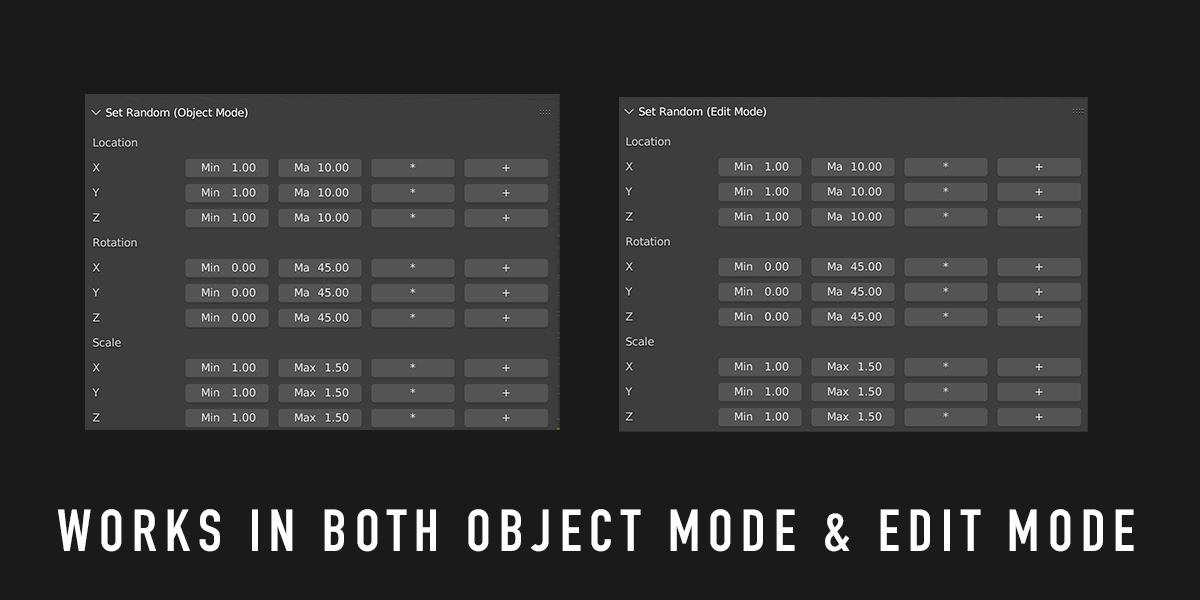
Set Random Plus is an EnnJinn add-on for Blender that randomizes location, rotation, and scale across selected objects, or applies random transforms to selected mesh elements. It extends Blender's default Set Random utility with separate reset and increment operations, plus Edit Mode support. The range controls let you choose between assigning new values and adding offsets to existing ones.
Reset values or add random offsets
In Object Mode, the * button sets each selected object's chosen transform value to a random value within its minimum and maximum range. The + button adds a random amount from that range to the existing value. For example, if an object's X position is 20 and the increment range is 0 to 5, its new position falls between 20 and 25. Use * to assign values inside a set of bounds, or + to add variation around objects' existing placements.
Randomize mesh selections in Edit Mode
Set Random Plus also works on selected vertices, edges, or faces in Edit Mode. The * operation gives each selected element its own random amount. The + operation applies one random value equally across the selection, so all selected elements move by the same amount along the chosen axis. This provides per-element variation or a shared offset for a mesh selection.
Choose axes and apply changes
Set minimum and maximum values for each X, Y, and Z axis. Use a row button to apply one attribute, or the large button at the bottom of the panel to apply all rows together. The tool covers location, rotation, and scale, with separate ranges for their axes. Its unit conversion utility respects Blender's metric and imperial settings. When recording is enabled, Object Mode adjustments made with Set Random Plus automatically insert keyframes.
Compatibility and license
The Superhive listing identifies the license as GPL and names Blender releases 3.0, 3.1, 3.2, 3.3, 3.4, 3.5, 3.6, and 4.0. Those are the releases shown on the listing; it does not confirm later versions. Check the current product listing for compatibility and licensing details before installing.