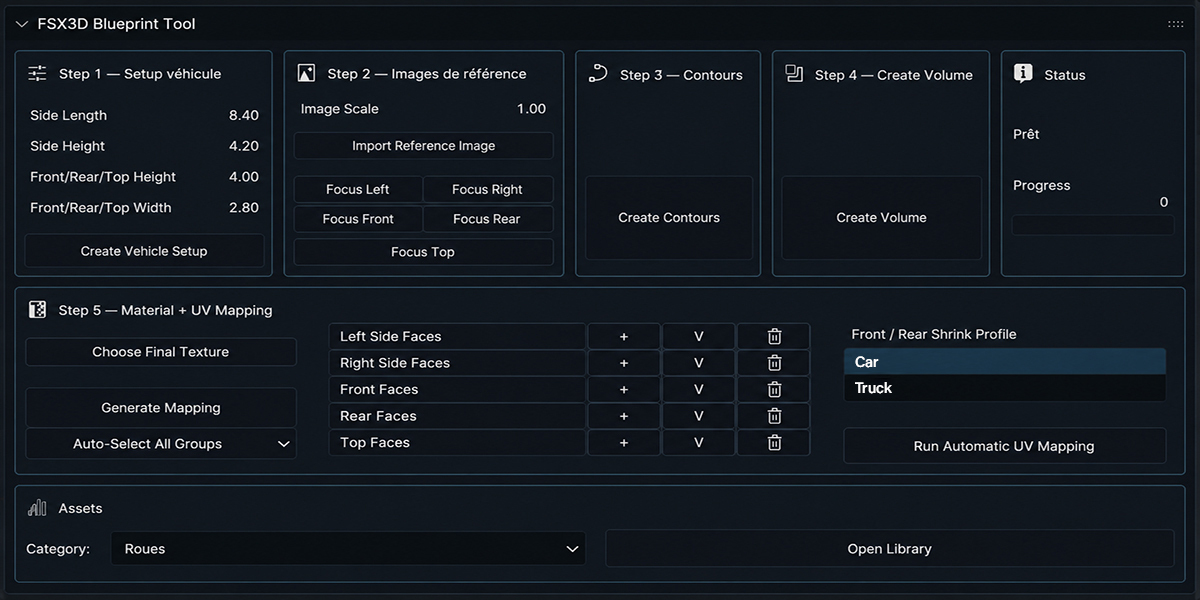
Fsx3D Blueprint Tool is a Blender add-on that turns a prepared multi-view vehicle blueprint into a low-poly base mesh. It guides the early modeling steps from setting vehicle dimensions through contour creation, volume generation and UV mapping. The result is a starting mesh for further work in Blender, not a finished vehicle made in one click.
Prepare the blueprint image
Use the included template to place the vehicle’s left, right, top, front and rear views in their designated areas. The template also has a bottom or extra-texture area. Set the vehicle’s length, height and width to create reference frames, then import the prepared image once. Focus buttons help you check each view in the Blender scene.
The product documentation recommends a clean, uniform green background and centered, consistently aligned silhouettes. Correct placement and readable outlines matter because the add-on uses the image to prepare the vehicle contours and base volume.
Generate contours and the base volume
After importing the references, run contour creation to prepare the main vehicle outlines. The volume step uses those outlines to generate the first low-poly 3D base. Review and refine that mesh for the intended shape and project before adding detail.
Map the texture and adjust face groups
Choose a final texture and run automatic UV mapping with the included template. You can preview the detected face groups, adjust a selection manually, lock the correction and run the mapping again. A Car / Truck profile adjusts the UV mapping behavior for the selected vehicle type.
A small asset library in the add-on panel includes car and truck wheels. Add them to the base, then move, modify or replace them as needed in Blender.
Compatibility and workflow limits
The product FAQ says the add-on is made for Blender 4.5.x and may work with other Blender 4.x versions; the documentation recommends Blender 4.5.x. Find the add-on in Blender’s 3D View sidebar under FSX3D Blueprint Tool. The generated mesh is intended as a low-poly base; expect to handle cleanup, detailing, optimization, materials and export in your own workflow.
See the product documentation for the workflow steps and the product listing for compatibility and license details. The listing identifies the add-on as GPL-licensed.