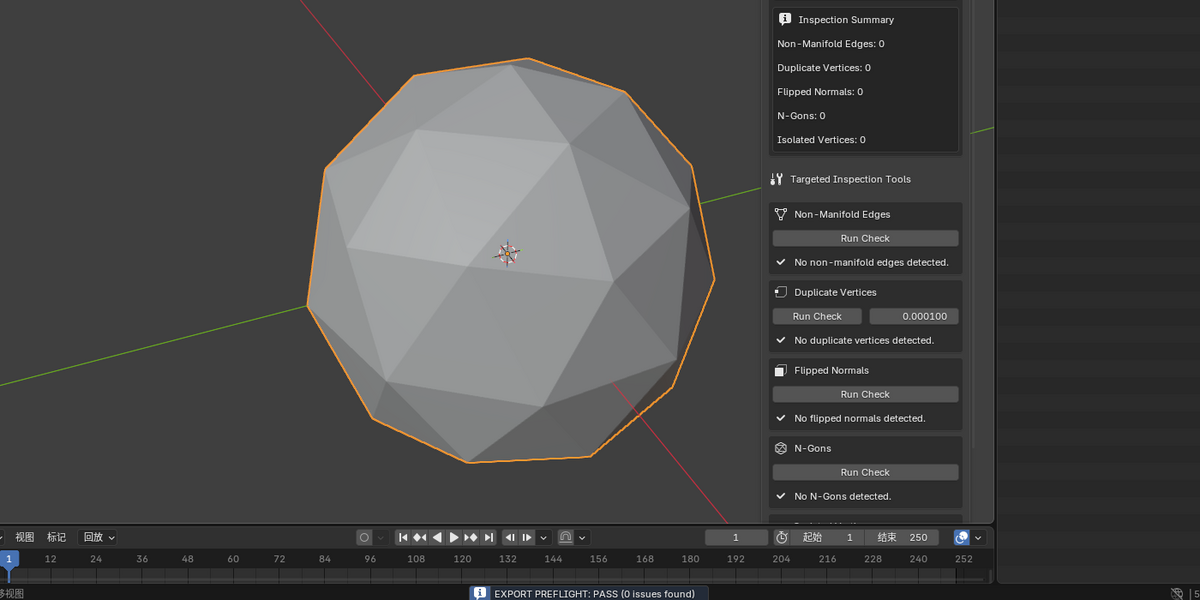
FUM - Fix Your Mesh is a Blender add-on for checking mesh topology before export. Its Export Preflight workflow checks for non-manifold edges, flipped normals, N-gons, duplicate vertices and isolated vertices. It reports results as PASS, WARNING or FAIL, and individual checks can highlight problematic geometry in the viewport.
Run a mesh export preflight
- Open the FUM panel inside Blender.
- Run Export Preflight.
- Review the PASS, WARNING or FAIL result.
- Run individual checks to highlight flagged geometry in the viewport.
This gives artists a way to review common topology issues before sending an asset into a production pipeline. The product information describes detection and highlighting; it does not document automatic geometry repair.
Compatibility and license
The Superhive listing's Compatibility section says Blender 4.0 and later; its Blender Version field gives 4.0 through 5.1. The Superhive listing gives the add-on's license as GPL-3.0 and displays a $2 price; the AnyPlugins guide labels it free to download. Check the FUM documentation and marketplace product listing for current details before installing.