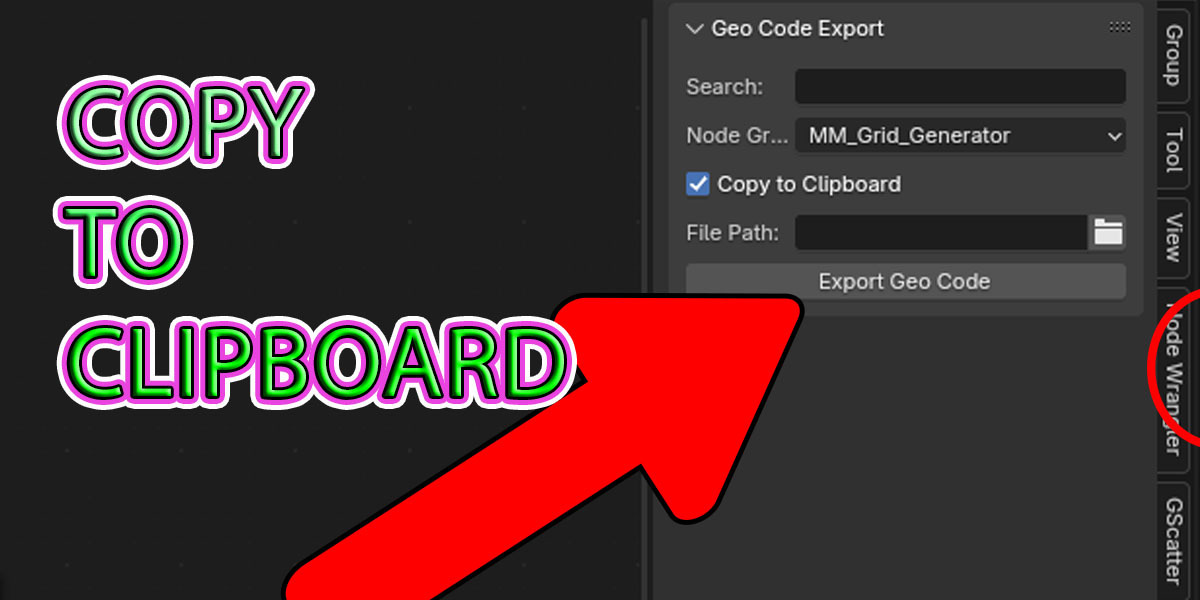
Geo Node Export is a Blender add-on for making a text record of a Geometry Nodes setup. Use fuzzy search to find a node group, then copy its exported structure to the clipboard, save it as a Blender text block, or write it to a text file. The file browser lets you choose where to save.
Choose a group and output
Open the add-on’s sidebar panel with N, then select the Geometry Nodes group to export. Choose an output method for the setup: copy it to the clipboard, save a Blender text block, or export a file. For a file, use the integrated browser to select a destination.
The documented outputs are text for sharing, documentation, or later reference. The available instructions do not describe importing that text to recreate a node group, so check with the developer if you need a round-trip workflow.
Who may find it useful
Teams can use the text to document node setups for a project. Educators can include it in explanations or tutorials, while freelancers can share a written record with clients. Blender artists and hobbyists may also keep text copies of setups they want to organize or revisit.
Compatibility and listing details
The Superhive listing names Blender 4.0, 4.1, 4.2, and 4.3, and identifies the license as GPL. AnyPlugins lists Geo Node Export as free. Check the Superhive listing and AnyPlugins entry for current availability and terms. The product documentation describes the sidebar workflow.