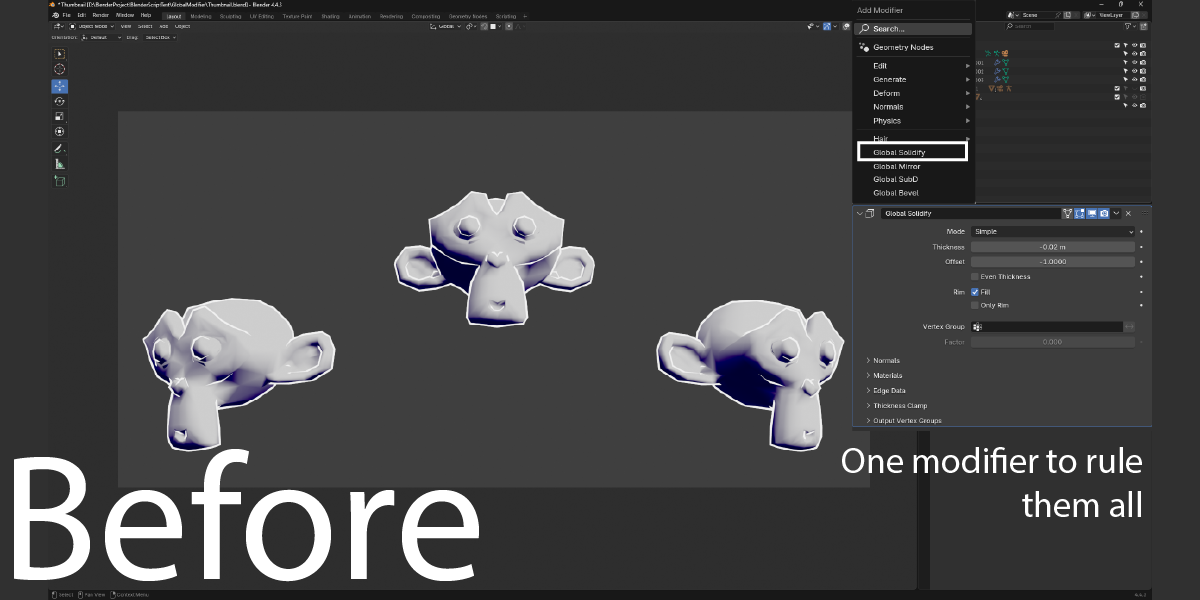
Global Solidify is a Blender add-on by Jammie that links settings between its special Global Solidify modifiers. Add the modifier to the mesh objects you want to control together. Changing a setting such as thickness or offset on one updates the others in the scene, while each object keeps its own vertex group assignment.
How the shared modifier works
The add-on adds a Global Solidify entry to Blender's Add Modifier menu. Objects do not need to be linked, grouped, or parented. An object joins the shared controls when it has the Global Solidify modifier.
- Add Global Solidify to each mesh you want to include.
- Adjust thickness, offset, or another modifier setting on one of them.
- Assign a vertex group to each object if you want its effect to vary across that mesh.
Where it fits
Global Solidify is intended for scenes with repeated parts that need consistent Solidify settings. The product listing names window panes, wall panels, flooring tiles, animated text, abstract shapes, and product components as examples. Its example uses ten sci-fi wall panels with a shared thickness of 2 cm, controlled from one modifier.
Keep vertex groups per object
Numerical modifier properties sync across participating objects, but each object's Vertex Group assignment remains separate. You can keep a common thickness while using different groups to control where the effect applies on individual meshes. For example, each panel in a repeated set can have its own masked areas while sharing the same thickness setting.
Compatibility and listing details
The Superhive product listing reports compatibility with Blender 3.0 through 4.5 and identifies the license as GPL. For installation information, the developer's documentation page points to a feature and installation video. Check the current listing for compatibility details if you use a Blender version outside the stated range.