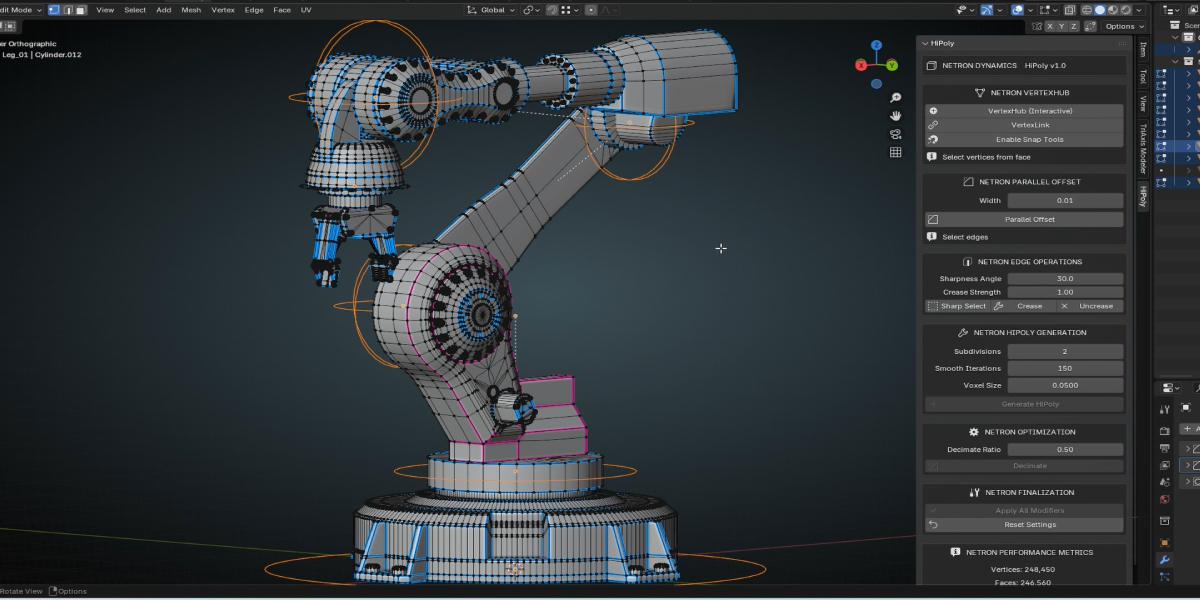
HiPoly is a Blender add-on from Netron Systems for editing mesh topology and generating a smoother, higher-resolution version of a prepared mesh. Its tools cover vertex connections, snapping, sharp-edge selection, parallel offsets and mesh generation. The documentation specifies Blender 4.5.0 or later.
HiPoly combines shortcut-driven mesh editing with a generation panel. Vertex and edge operations run in Edit Mode, while HiPoly generation runs in Object Mode.
Vertex and edge tools
- VertexHub: In Edit Mode, select at least two vertices around a face, then press Ctrl+Alt+C. Move the mouse to position a center vertex in the face plane. Left-click confirms; right-click or Esc cancels.
- VertexLink: Select at least two vertices and press Ctrl+Alt+V. The last-selected vertex is the active hub. HiPoly adds missing connections to it and skips edges that already exist.
- Snap Tools: If snapping behaves incorrectly, turn off Blender’s existing snap settings, then enable HiPoly’s Snap Tools to configure vertex snapping with auto-merge. Disable Snap Tools to return to the default settings.
- Edge operations: Set a sharpness angle from 0.1° to 180°; HiPoly selects edges above that threshold. Parallel Offset creates a parallel edge with a chosen width and has the Ctrl+Alt+P shortcut. For selected edges, set crease strength from 0.0 to 1.0, then apply or remove the crease.
Generate and monitor a HiPoly mesh
Select an active mesh in Object Mode to use Generate HiPoly. The tool creates a new object with the suffix _netron_hipoly. Its settings include subdivisions from 1 to 4, smooth iterations from 0 to 500, and voxel size from 0.001 to 1.0. More subdivisions produce smoother but heavier geometry, while a smaller voxel size gives a higher-resolution remesh.
A live metrics panel shows vertex and face totals so you can track mesh complexity while working. The Decimate control reduces the polygon count according to a ratio from 0.0 to 1.0: 1.0 makes no reduction, 0.5 halves the count, and 0.1 reduces it by 90%. Apply All Modifiers applies every modifier on the active object.
Installation and requirements
The HiPoly product listing shows Blender 4.5 and a GPL license. To install it, use Blender’s Edit > Preferences > Add-ons > Install command with the HiPoly.zip file, enable “Mesh: HiPoly,” then open the HiPoly tab in the 3D Viewport sidebar. Review the current listing and documentation for compatibility and license details before using the add-on.