Mesh Tools is a Blender add-on by Mergim Sahiti that collects vertex and edge operations, hole filling, triangulation, and live mesh statistics in one sidebar panel. It is aimed at modelers who want these controls together while working on geometry.
Vertex and edge operations
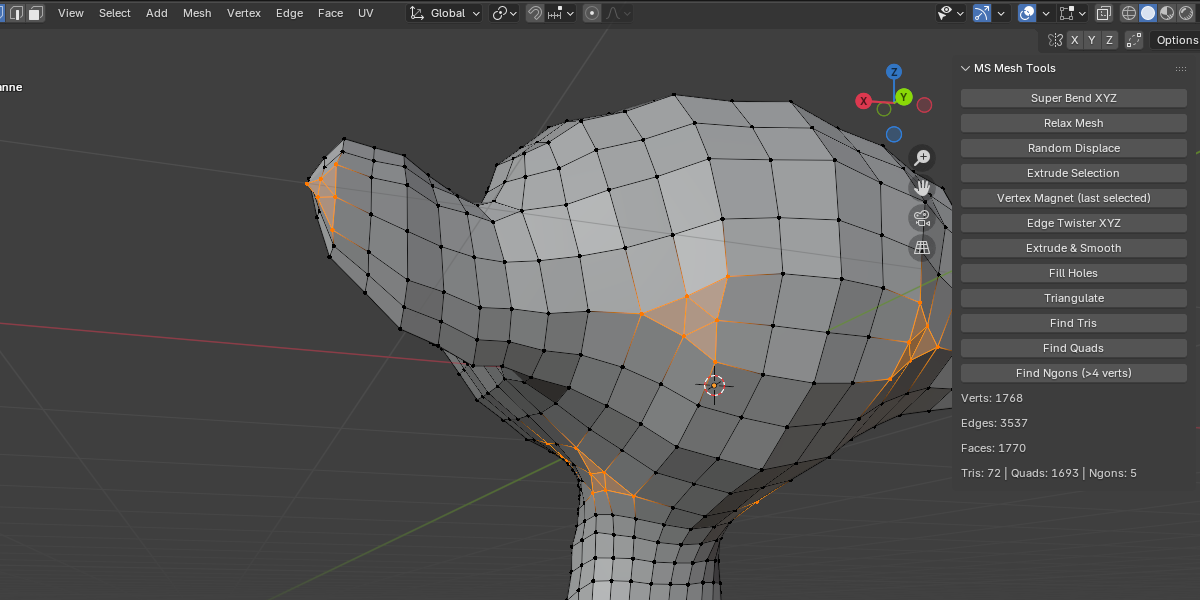
Super Bend XYZ bends selected vertices along the X, Y, or Z axis, while Edge Twister twists selected edges along those axes. Relax Mesh smooths selected vertices with adjustable strength, and Random Displace shifts them randomly. Vertex Magnet moves selected vertices toward the last selected vertex. For extrusion, use Extrude Selection along an axis or Extrude & Smooth to combine extrusion and smoothing.
Mesh cleanup and counts
Fill Holes closes mesh openings, and Triangulate converts quads to triangles. Find Tris, Find Quads, and Find Ngons select faces by their vertex count. Live Mesh Info displays vertex, edge, and face totals, plus counts for tris, quads, and ngons; its counts update live in Edit Mode.
Compatibility and license
The Superhive listing identifies Mergim Sahiti as the developer, lists Blender 4.0 through 4.5, and gives the license as GPL. The AnyPlugins catalog lists the add-on as free.