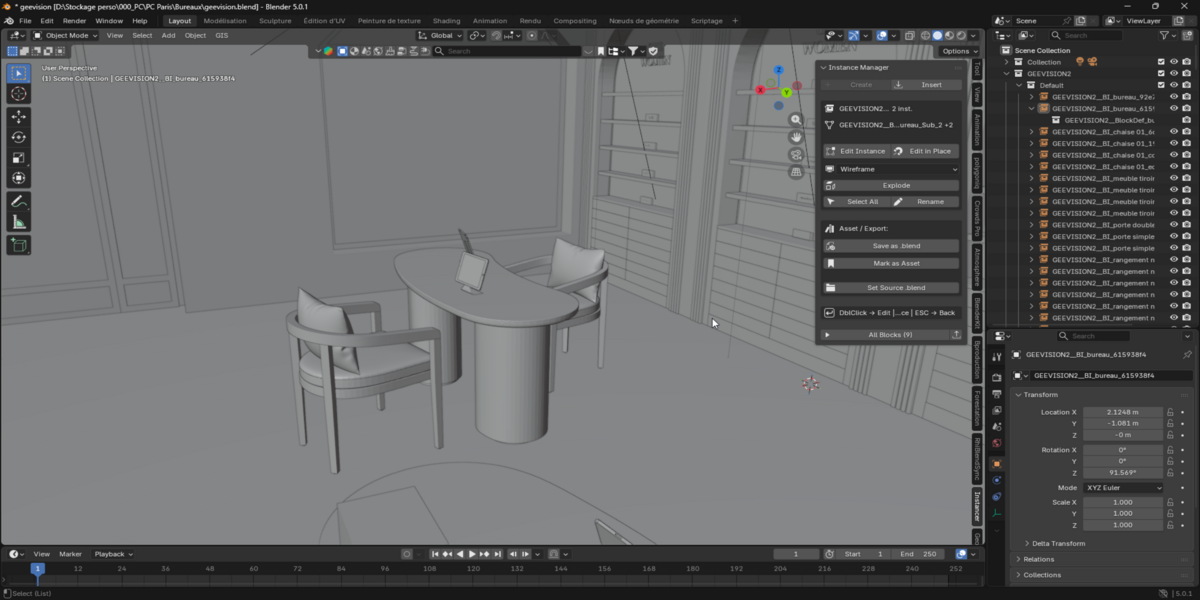
Instancer Editor + is a Blender add-on for editing collection instances as reusable blocks. Double-click an instance in the viewport to edit its definition, and the other instances update live. You can edit in isolation or use Ctrl + double-click to work in place with the rest of the scene visible and locked. The Superhive product listing describes its editing tools and supported workflows.
Edit instances in context
In isolated mode, the scene steps aside while the block appears at the instance’s position, rotation, and scale. Edit in Place keeps the scene visible for context and locks surrounding objects. While editing in place, you can show the locked scene as wireframe, a tinted solid color, or bounding boxes. Optional ghost instances display other copies as locked wireframes so you can see how edits affect them.
Nested blocks can be opened at any depth. A breadcrumb shows the current level; Esc exits one level and Shift + Esc exits all levels. The double-click shortcuts work in Object Mode, and you can turn them off in the add-on preferences if they conflict with your setup.
Manage block definitions
The block browser lists definitions in the file with their instance counts, and lets you search for a definition or select all its copies. Replace points selected instances to another definition while preserving position, rotation, and scale. Make Unique gives selected copies their own definition. Set Block Origin moves the insertion point to the centroid, bottom center, or 3D cursor while keeping the instances in place.
You can also add scene objects to a block or remove them without changing their positions. Pick & Add lets you choose objects in the viewport, including locked ones. The material panel lists materials used inside a block, selects objects by material, and assigns a material to the whole block.
Work with assets and imported blocks
When you edit an Asset Library instance, Smart Localization turns it into an editable local block and keeps the modifier settings already tuned in your file. Instancer Editor + also supports native collection instances, Rhino Blocks imported from 3DM, and imported FBX and glTF hierarchies; Geometry Nodes modifiers are preserved during localization. A CSV report can include block definitions, instance counts, object and polygon totals, and source files.
Superhive’s listing headline gives a Blender range of 4.2 to 5.1+, while its Details section lists 4.0 to 5.1. Check the current seller listing for the exact Blender version supported before installing.