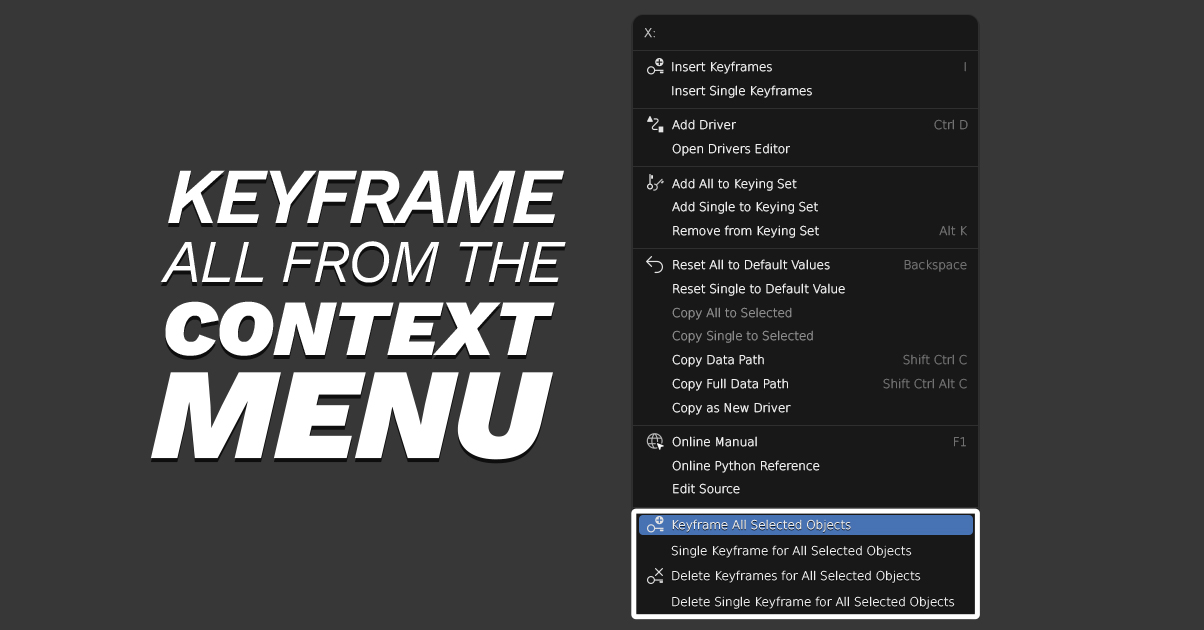
Key Selected Objects is a Blender add-on from Blastframe for inserting or deleting keyframes across multiple selected objects. Select the objects, right-click a property, then choose "Keyframe All Selected Objects." The action puts multi-object keyframing in the property menu, which can help when the available Keying Sets do not cover the property you need.
Keyframe property groups and remove keys
The add-on can keyframe all dimensions in a multi-dimensional property group, such as Location, Rotation, or Scale. It can also delete keyframes. This suits animation work where several selected objects need keys on the same type of property, without repeating the operation object by object.
Its supported properties extend beyond object transforms. The product FAQ lists Modifiers, Constraints, Physics properties, and Custom Properties. For materials, Key Selected Objects works with matching Surface Shaders, including materials that use Principled BSDF.
Version 1.2 additions and compatibility
Version 1.2 adds multiple pose bones or objects to Keying Sets and support for Custom Properties and Grease Pencil Layers. That extends the add-on's use to character animation and Grease Pencil work alongside object animation.
Superhive lists compatibility with Blender 2.8 through 5.2, marks the add-on as Blender Extension Compatible, and identifies its license as GPL. The Documentation page links to the official Key Selected Objects documentation.