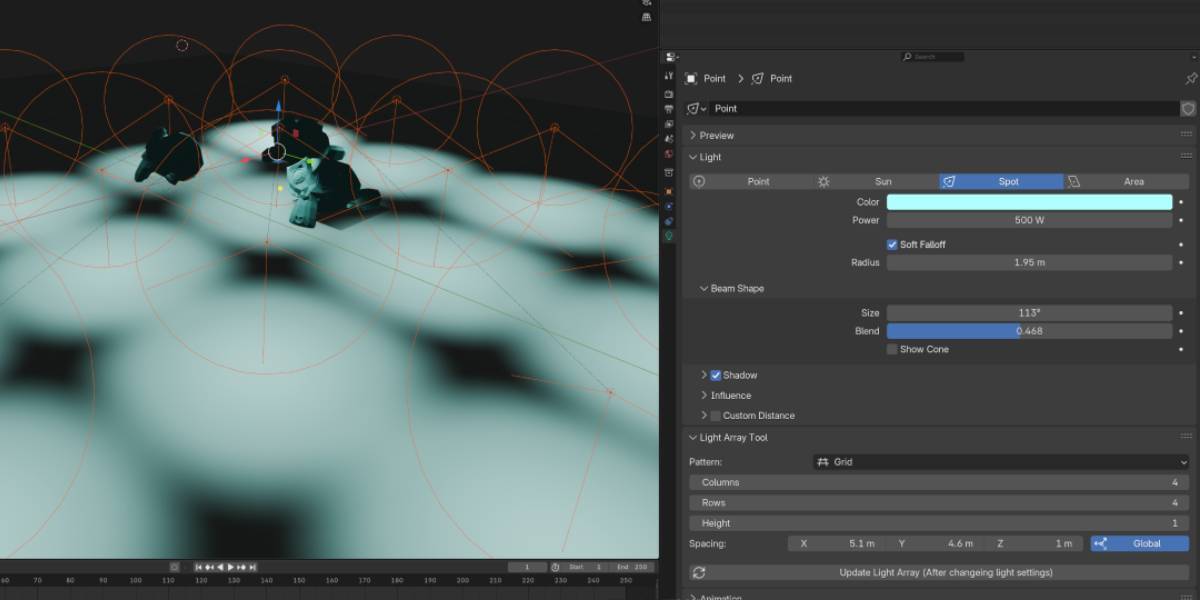
Light Array Tool is a Blender add-on by GilaDDD for creating rows, grids, and volumes of lights. It replaces repeated manual duplication and alignment with controls for light counts per axis, spacing, color, intensity, and layout. You can also choose local or global alignment. The layouts can be used for studio-style setups, LED grid effects, character rim lights, product renders, and stylized scene accents.
Array controls and scene organization
Set the number of lights on each axis and their spacing, then adjust color, intensity, and layout for the scene. Local or global alignment lets you choose how the array is oriented. These controls are useful when a setup needs repeated lights at deliberate intervals, such as a panel arrangement or a row of rim lights.
Light Array Tool parents the generated lights to a controller light. That arrangement lets you move the lights as a group and simplifies cleanup. Version 1.2 also added a Remove Lights Array button for deleting an array.
Where it can fit
A grid can create an LED wall effect or a panel-light layout, while rows or volumes can repeat accents across a scene. These are possible uses, so the final lighting still depends on how the artist sets up the scene.
Compatibility, license, and updates
Superhive's product listing identifies Blender versions 3.6 through 4.5 and a GPL license. Its render-engine field names Blender-Internal, Blender-Game-Engine, Cycles, and Eevee. Check the current listing for compatibility details if you need a particular engine and Blender version combination.
The listing's version 1.2 changelog, dated October 23, 2025, says it fixed a bug that left out one light at the end of a grid, added the Remove Lights Array button, and included general improvements and minor bug fixes. Version 1.1 fixed a crash during installation.