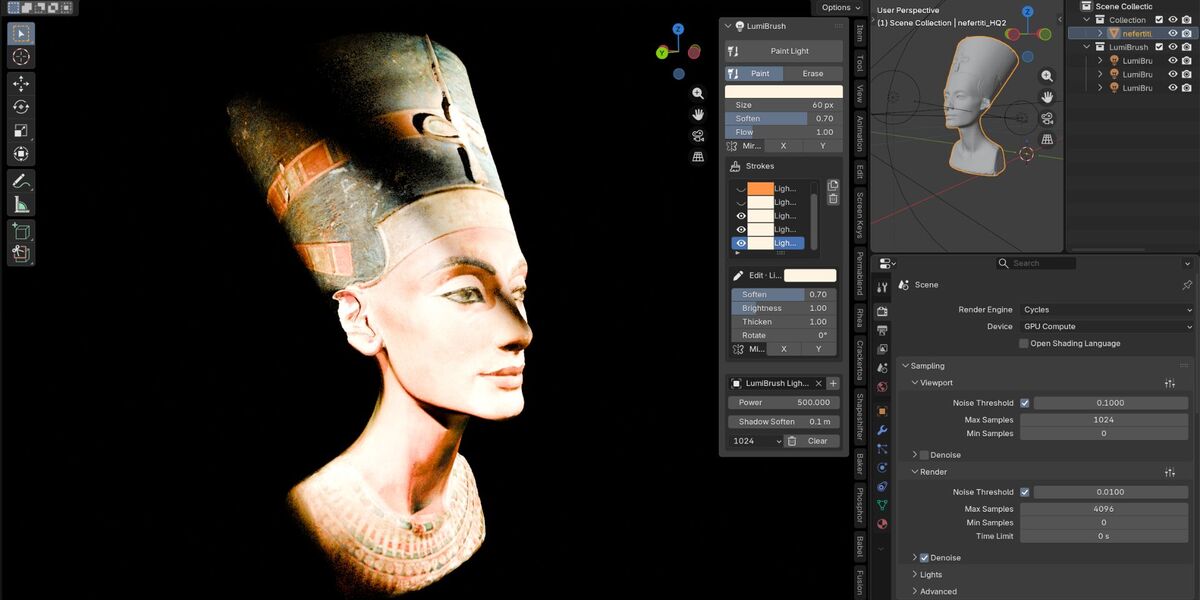
LumiBrush is a Blender add-on for painting light directly into a scene. Drag its brush across the scene to place light where you stroke, then adjust each stroke afterward. The product listing describes the lighting as having true shadows, falloff and bounce, with live rendering in Cycles and EEVEE.
Paint light into the scene
LumiBrush is intended for Blender artists who want to shape illumination by painting over their scene.
A demonstration video on the product page shows the brush workflow.
Use it with Cycles or EEVEE
LumiBrush works live in both Cycles and EEVEE, according to its listing. Consult the product documentation for setup details.
Check compatibility and license
The listing identifies LumiBrush as a Blender extension-compatible add-on and gives a Blender version range of 4.2 through 5.2. If your project uses a version outside that range, confirm compatibility with the developer before relying on it. The listing names Egret Studios LLC as the developer, includes 12 months of support from the studio, and lists product updates. It also identifies the license as GPL.
The product page links to its documentation and demonstration video. Review the LumiBrush product listing for the current compatibility and license details before installing.