Loop Noise Generator is a Blender add-on for applying procedural noise to objects and armature bones, then repeating the motion in a loop. It suits idle movement, breathing effects, swaying plants, and motion through a bone chain. To begin, select an object or bone, enable an X, Y, or Z channel, and adjust its strength and speed. See the AnyPlugins product page for the complete feature overview.
Shape motion with channel controls
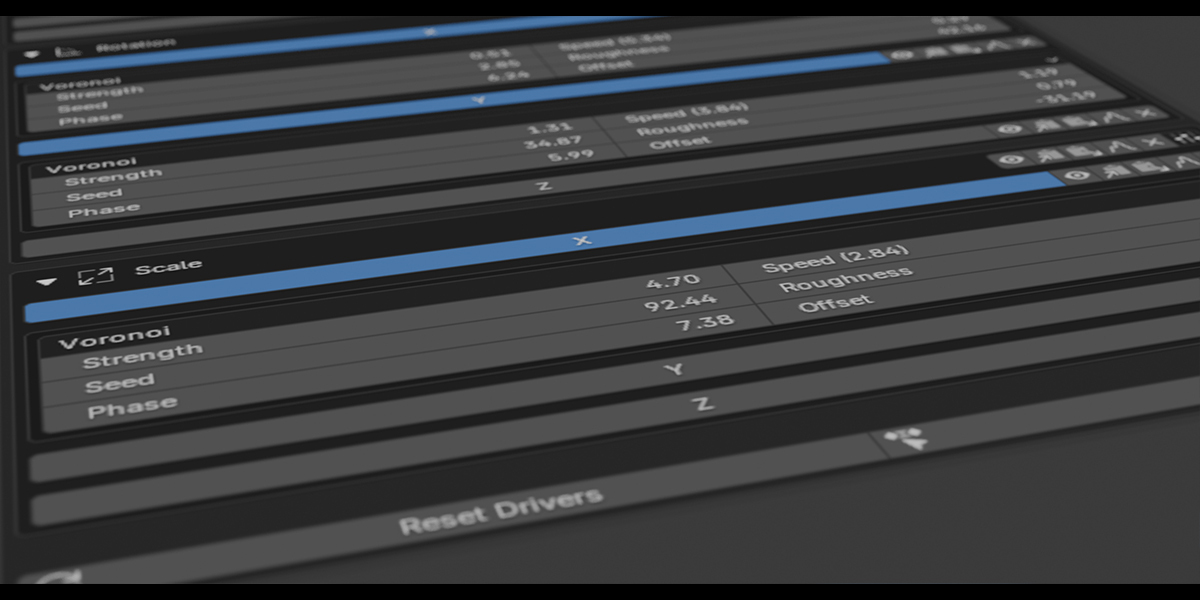
Each channel has controls for Strength, Speed, Seed, Roughness, Phase, and Offset. You can choose Perlin, Simplex, or Voronoi noise, then use one of 11 easing options for the loop transition. Global multipliers adjust settings across channels. Multi-selection lets you edit several objects or bones at once, and presets save configurations for reuse or sharing.
Animate bone chains and randomize targets
Dynamic Chain Mode starts with a parent bone. Its children inherit the noise with a progressive time offset, creating wave-like motion along the hierarchy. Chain Offset Delay controls how quickly the motion propagates. Examples include tails, tentacles, and spines.
Smart randomization has three modes: a click gives each target individual random values, Shift-click synchronizes values across targets, and Shift-Ctrl-click copies settings from the active object to all selected objects.
Reuse settings and bake keyframes
Each action remembers its own noise configuration. The system clipboard can transfer settings between Blender instances. Copy a single channel, a Location, Rotation, or Scale section, global settings, or all settings with Master Copy/Paste. The add-on checks clipboard data types and reports a mismatch when the copied data does not fit the selected paste option.
You can bake the procedural motion to keyframes for use in a game engine or render. For bones using quaternion rotation, the add-on provides a one-click conversion to Euler mode that preserves the existing animation.
Version 1.6.6 and listed compatibility
The Superhive listing dates version 1.6.6 to January 30, 2025. It lists Blender 3.0 through 4.5 compatibility, Blender Extension compatibility, the package type as Add-on, and a GPL license. Its release notes describe several reliability changes:
- Loop noise settings survive object and armature renaming because drivers use object references instead of hardcoded names.
- When switching actions, the add-on rebuilds drivers and constraints for bones with enabled channels, regardless of selection or active-bone state.
- After a file loads, driver rebuilding waits 0.5 seconds, increased from 0.1 seconds.
- Action detection works independently for each object, and copy/paste works between Blender instances through the system clipboard.
Check the product listing for the download and the compatibility details that apply to your Blender version.