Machete Toolkit is a Blender add-on that groups mesh editing, object placement, and selection management tools. It can suit modeling sessions involving retopology, edge cleanup, object alignment, and saving selections for later use.
Geometry and placement tools
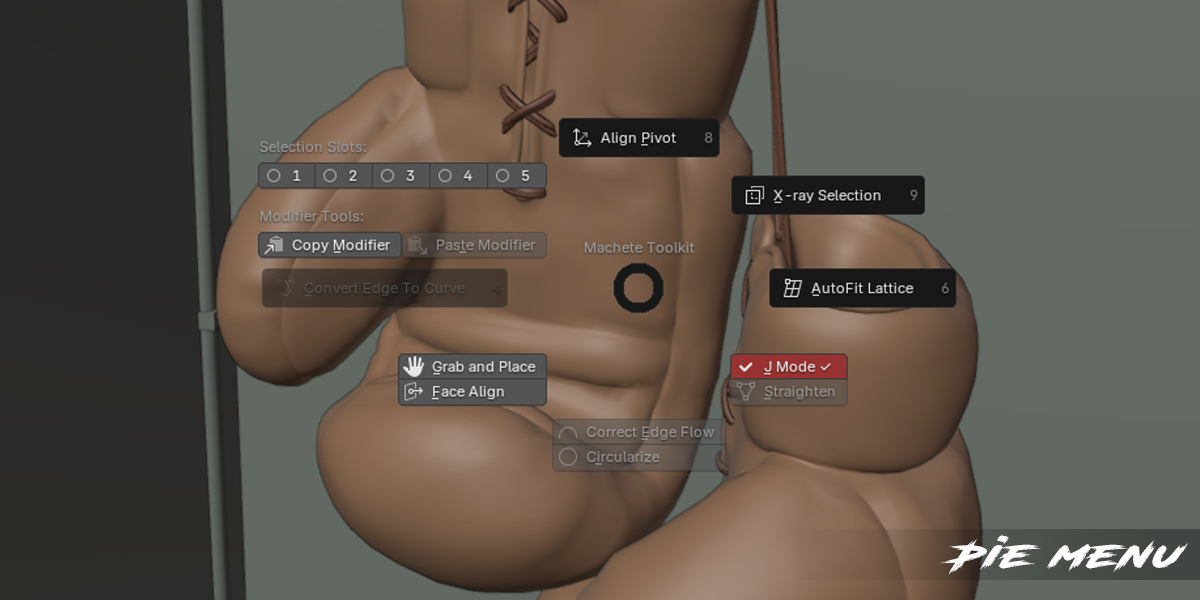
Edge Flow Correction adjusts selected edges to follow surrounding geometry. Circularize turns selected vertices into circles while preserving their 3D orientation. The Edge to Curve Converter makes curves from selected edges with real-time bevel control. Straighten Edge Loops has a J-method that changes topology and an axis-based method that adjusts positions.
For object setup, AutoFit Lattice creates a minimum-volume lattice aligned to the selection's longest dimensions. Grab & Place supports interactive placement with automatic ground offset and face snapping. Face Align matches face orientations between objects, while Align Pivot positions the cursor from selected geometry.
Selection management and access
Selection Saver stores and recalls selections across edit and object modes. Its slots support vertex, edge, face, and object selections, and Quick Slots provide one-click save and restore. The toolkit also includes selective modifier copy and paste and an X-Ray toggle.
Open the customizable pie menu with Shift+E by default. Tools are also available in the 3D Viewport's N-panel and through Blender's F3 search; Grab & Place can be used as a workspace tool. See the Machete Toolkit documentation for installation steps and tool instructions.
Compatibility notes
The Superhive product listing specifies Blender 3.6 through 5.2. Its documentation's compatibility section says Blender 3.0+ and notes that some features may be limited below 3.5. An AnyPlugins catalog entry marked its facts verified in July 2026 and lists Blender 3.6 through 5.0. The reported compatibility differs; check the current Superhive listing and documentation for the Blender version you use.