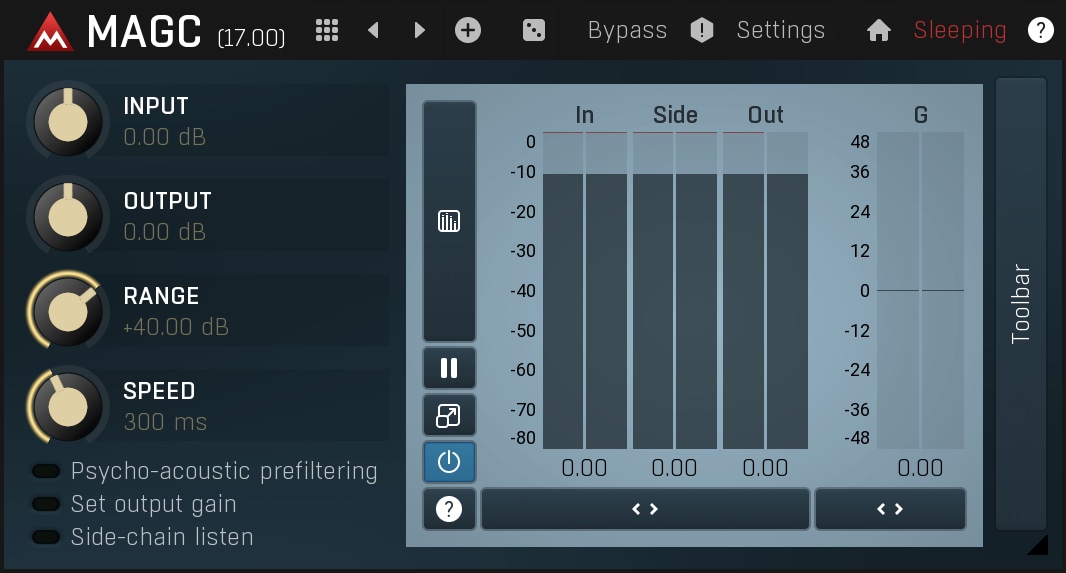
MAGC is a MeldaProduction effect that adjusts its input level to match a signal routed to its side-chain. It suits producers and mix engineers who want a track to follow a reference level, or need to compensate for level changes in a processing chain. Insert MAGC on the track to adjust, then use a host and plugin format with side-chain support to route a reference track or bus to MAGC's side-chain input.
Set the response and gain range
The Speed control sets MAGC's response time, from 1 ms to 10,000 ms, with a default of 300 ms. Range sets the maximum gain adjustment from 0 dB to 60 dB, defaulting to 40 dB. The Input gain control affects the audio being processed, not the side-chain; Input gain and Output gain each range from -24 dB to +24 dB.
MAGC can estimate loudness with psycho-acoustic prefiltering, which is off by default. When enabled, the detector accounts for how different frequencies are perceived. MeldaProduction advises against using this mode with limiters, where peak control is the goal.
Check the reference and hold a correction
Use Side-chain listen to hear the signal driving MAGC and confirm that the intended reference is routed. Its meters show input level, output level and the gain adjustment. The MAGC manual describes these controls and the level-matching workflow.
Set output gain applies the current level compensation to Output gain and stops processing, so MAGC holds the current correction instead of following changes in the side-chain.
Compatibility and access
MeldaProduction lists Windows 10 or 11 (64-bit), VST, VST3 or AAX hosts, and an Intel or AMD processor with SSE2 support. On 64-bit macOS 10.14 or newer, MeldaProduction lists VST, VST3, AU and AAX support for Intel, AMD and Apple Silicon. Linux is not directly supported. MeldaProduction says its plugins may run through Wine if the .wine/drive_c/windows/Fonts/ directory contains Microsoft True Type Fonts. Check the MAGC support page and system requirements for host details. In Cubase, use MAGC's VST3 version for side-chain routing; Cubase does not support side-chaining for VST2 plugins.
MeldaProduction lists MAGC as a free effect in the MFreeFXBundle. Its listing does not state whether commercial use is allowed; consult MeldaProduction's licensing information.