Matte and layer operations
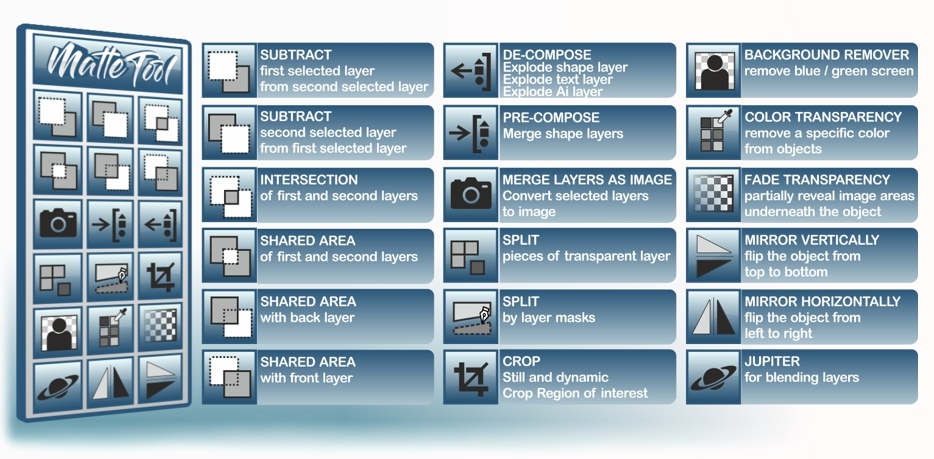
Matte Tool 2 is a set of 20 After Effects tools for working with mattes and layers. Its matte controls combine layers with Merge, Subtract, Intersect and Exclude operations. It also includes one-click precompose and decompose tools, plus cropping for a composition’s contents, an individual layer or selected layers as a group. The crop tool works with animated objects in a selected work area.
Mask, keying and transparency tasks
Split By Mask separates a layer using drawn masks. One method uses closed masks to cut out areas; the other starts with a four-vertex rectangular mask, then uses open, linear masks with a chosen number of vertices. Split Parts Of Transparency Layer separates components from a layer or composition, provided the source object has transparency.
For screen footage, Green And Blue Screen Remover can detect the background color automatically or let you pick it from a preview and adjust alpha modes. A separate color transparency tool removes a chosen color. Fade Transparency uses two points to create a linear transparency change on a layer or composition. Blending Layers uses a shape layer to define areas that reveal the layer underneath; the blended objects can be moved and animated.
Layer conversion
Merge Layers As Image combines selected layers into one image layer, with an option to replace the selected layers. The toolset also lists commands to merge shape layers and explode shape, text and Ai layers. It suits After Effects users who regularly prepare mattes, split masked layers, key colored screens or adjust transparency in layer-based compositions.
The product listing names compatibility with After Effects 2026, 2025, 2024, 2023, 2022, 2021, 2020, CC 2019, CC 2018, CC 2017, CC 2015.3 and CC 2015.
The Matte Tool 2 listing currently flags a Floating License Server as required. aescripts’ general license guide says floating licenses require that server, while Single User Licenses do not. For a floating setup, the server is a command-line application intended for groups, and remote users need VPN access to the license network. Confirm which license type is offered for Matte Tool 2. The listing also offers a free trial but does not state its duration.