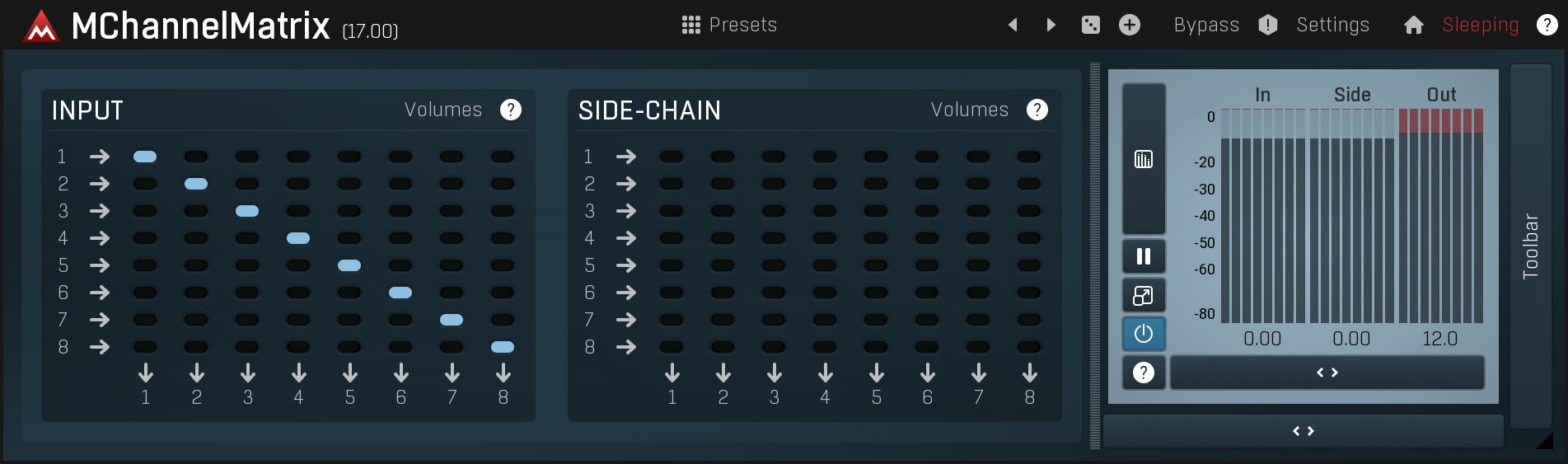
MChannelMatrix is an audio plug-in for routing channels from its main input and, when the host supplies one, its side-chain input. Its routing grids let you choose which source channels reach each output. MeldaProduction lists uses such as swapping left and right or taking a left channel from the side-chain. When several inputs feed one output, the plug-in mixes them together, as described in the MChannelMatrix manual.
Route main input and side-chain channels
The main-input grid maps input channels to output channels. When the host supplies a side-chain input, a separate grid maps its channels to outputs. You can route an input to more than one output, or combine several inputs at one output.
- Swap left and right when the source channels need to reach opposite outputs.
- When the host supplies a side-chain input, route its left channel to the output you need.
- When the host provides a side-chain input, combine multiple side-chain channels at one output.
Choose a channel mode
For stereo work, L+R processes the left and right channels together. L and R select one side. Mid (M) processes the center signal while leaving the side signal intact; Side (S) does the reverse. M+S processes both mid and side with the same settings. The manual describes using two instances in series when you need separate settings for left and right, or for mid and side.
The Left+Right(neg) (L+R-) mode inverts the right-channel phase. Melda's manual describes it for channels that seem out of phase or for a deliberate effect, and warns that the result can nearly disappear when played in mono.
Surround and ambisonics
MChannelMatrix supports surround processing for up to 8 channels and ambisonics up to 64 channels (7th order). For surround with VST2, first enable surround in MeldaProduction's global plug-in settings and restart the host. VST3, AU and AAX do not require that activation step. Ambisonics requires global activation and a host restart; then select Ambisonics mode and set the required order. Your DAW must also support the relevant multichannel buses.
Compatibility and access
MeldaProduction lists Windows 10 or 11 (64-bit), with a VST, VST3 or AAX host and an Intel or AMD processor with SSE2 support. On macOS, it lists version 10.14 Mojave or newer (64-bit), VST, VST3, AU or AAX hosts, and Intel, AMD or Apple Silicon processors. Linux is not directly supported; MeldaProduction says the plug-ins may work through Wine. Side-chain support also depends on the host and format: MeldaProduction says Cubase does not support side-chain routing with VST2, and Pro Tools does not support stereo or surround side-chains.
MeldaProduction says Ableton Live does not use the reported buses properly, so MChannelMatrix's surround processing does not work there; its listed workaround is VST, which reports stereo capabilities by default. Separately, MeldaProduction strongly recommends VST3 for Live 11 and 12 on macOS because it reports multiple issues with its AU plug-ins in those DAWs. The product page labels MChannelMatrix a free effect and points to MFreeFXBundle. See the system requirements before choosing a format.